
A Developer's Guide to the LangChain Vector Store
Unlock powerful RAG systems with our guide to the LangChain vector store. Learn how to choose, implement, and optimize vector stores for better AI retrieval.

Think of a LangChain vector store as a specialized, intelligent library for your AI. But instead of organizing information by alphabet, it arranges everything by meaning. This lets your AI find what it needs by understanding concepts, not just matching keywords.
This component is foundational for building effective Retrieval-Augmented Generation (RAG) systems. It acts as the long-term memory that feeds crucial context to a Large Language Model (LLM), and optimizing it is the key to improving your RAG system's performance.
Unlocking Your Data with LangChain Vector Stores

Imagine trying to find one specific idea in a massive library where none of the books have titles or chapters. You’d be forced to read every single page. Traditional databases often have this exact problem with unstructured data like text documents. A LangChain vector store is the solution for enabling high-quality retrieval.
It works by converting all your documents into numerical representations, which we call embeddings. These aren't just random numbers; they capture the semantic DNA of the text.
Information with similar meaning gets placed close together in a high-dimensional space. When you ask a question, your query is also turned into an embedding. The system then just has to find the data points that are "closest" to your query, which are also the most conceptually relevant.
The Power of Abstraction
So, where does LangChain itself fit into this puzzle? LangChain is like a universal adapter. It provides a common, simple interface for dozens of different vector databases, letting you focus on retrieval strategy instead of boilerplate code.
Instead of writing custom code for Chroma, Pinecone, or Weaviate, you can just use LangChain’s standard VectorStore class to talk to any of them. This abstraction is a massive advantage for a few key reasons:
- Flexibility: You can swap vector databases with minimal code changes. This freedom lets you experiment to find the perfect fit for your project’s performance and budget.
- Simplicity: It standardizes the whole RAG workflow, from loading documents and creating embeddings to storing and retrieving them.
- Interoperability: It connects your vector store seamlessly to all the other parts of the LangChain ecosystem, like LLMs and document loaders.
The whole point of a LangChain vector store is to enable powerful new capabilities, especially in AI-powered knowledge management, where turning scattered files into a searchable knowledge base is the main goal. To get a better handle on the framework itself, check out our comprehensive guide to LangChain at https://chunkforge.com/blog/langchain.
LangChain has become a cornerstone for modern AI applications, especially RAG pipelines. By providing a unified API, it gives developers the freedom to build robust systems without being locked into a single vector database provider. This is the key to building scalable, context-aware AI.
The framework’s incredible adoption numbers speak for themselves. LangChain supports over 60 different vector stores, and its vibrant community of over 4,000 open-source contributors has helped power the creation of more than 132,000 LLM applications. This makes the LangChain vector store an essential tool for any developer looking to build intelligent applications on top of their own data.
How to Choose the Right Vector Store
Picking a LangChain vector store is one of those decisions that will absolutely make or break your RAG system down the line. It's not just about grabbing the latest tech; it’s about matching the database's capabilities to your retrieval goals, whether you're just kicking the tires on a prototype or building an enterprise-grade application.
The choice you make boils down to a few critical trade-offs. Do you need the dead-simple setup of an in-memory database for a weekend project, or are you ready for a managed service that can effortlessly scale to millions of documents? Answering this question upfront saves you from the future headaches of costly migrations and frustrating performance bottlenecks.
And this space is moving fast. The vector database market is projected to skyrocket from USD 2.2 billion, with heavy hitters like Pinecone and Zilliz already grabbing 45% of the market. These platforms are building AI-native features that are a perfect fit for LangChain, which now supports over 60 different vector stores. This creates an incredibly rich ecosystem for developers. You can dig into the numbers in this comprehensive market report.
Comparing Your Options
To cut through the noise, let’s split the options into two main camps: the quick-and-dirty self-hosted tools and the powerful, managed cloud services. Each has its place.
Lightweight & In-Memory Stores
These are your go-to options for getting started quickly without pulling out a credit card.
- Chroma: An open-source, in-memory vector store that’s ridiculously easy to get running. It’s the perfect choice for local development, tutorials, and small projects where you want a RAG pipeline up and running in minutes, not hours.
- FAISS (Facebook AI Similarity Search): This isn't a full-blown database but a hyper-optimized library for similarity search. It’s incredibly fast but leaves the storage and management infrastructure up to you. Think of it as a powerful engine you build your own car around.
These tools are fantastic for learning and rapid prototyping. Their real magic is the speed of iteration—you can test chunking strategies and retrieval logic right on your laptop without spinning up cloud servers or wrestling with complex configurations.
Production-Ready Managed Services
When you're ready to handle real-world traffic and data, you'll want to look at one of these.
- Pinecone: A fully managed, cloud-native vector database built for speed and scale. It's a favorite for production RAG systems that demand low-latency search and high reliability without the operational overhead.
- Weaviate: An open-source vector search engine you can self-host or use as a managed service. Its standout features are a slick GraphQL API and support for hybrid search, letting you blend keyword and vector search for more accurate results.
- Milvus: A beast of an open-source database designed for truly massive datasets. If you need to manage billions of embeddings with high availability, Milvus is a top contender, especially for enterprise use cases.
To help you see how they stack up, here’s a quick comparison of the most popular options available in LangChain.
LangChain Vector Store Options At a Glance
| Vector Store | Best For | Deployment Model | Key Feature |
|---|---|---|---|
| Chroma | Prototyping & Local Development | Self-Hosted (In-Memory/On-Disk) | "Just works" simplicity, fast setup |
| FAISS | High-Performance Similarity Search | Self-Hosted (Library) | Raw speed and algorithmic efficiency |
| Pinecone | Production RAG & Low-Latency Applications | Managed Cloud Service | Serverless, easy to scale, developer-first |
| Weaviate | Hybrid Search & Flexible Deployments | Self-Hosted or Managed Cloud | GraphQL API, keyword + vector search |
| Milvus | Enterprise Scale & Massive Datasets | Self-Hosted or Managed Cloud | Handles billions of vectors, highly available |
| Redis | Existing Redis Users & Real-Time Apps | Self-Hosted or Managed Cloud | Adds vector search to a familiar datastore |
This table should give you a solid starting point, but always dig into the documentation to see which one feels right for your team and your tech stack.
Making the Final Decision
Ultimately, the "best" vector store is the one that fits your use case. Are you building a personal knowledge chatbot or a customer-facing AI assistant for a global audience? A startup might lean toward a serverless option like Pinecone to keep the ops team lean, while a large enterprise with strict data governance rules might choose to self-host Milvus.
The good news? LangChain’s abstraction layer gives you breathing room. You can start with something simple like Chroma to prove out your concept and then swap in a more powerful database later with just a few lines of code changed. This flexibility means your RAG system can evolve right alongside your project's needs.
Putting Your Data into a Vector Store
So, how do you get your documents into a shape that an AI can actually use? This is the first, most crucial step in building any Retrieval-Augmented Generation (RAG) system. The whole process is called indexing, and it’s all about turning your raw files into a smart, searchable knowledge base.
With a LangChain vector store, what sounds like a complex, multi-stage pipeline gets a whole lot simpler.
The big idea is to chop up large documents into smaller, bite-sized pieces that make sense on their own. We then convert those pieces into numerical form (called embeddings) and load them into a special database—the vector store—so we can find them in a flash. This lets you search for concepts and ideas, not just exact keywords.
The Indexing Workflow Explained
To build an effective indexing pipeline, you really only need to think about four key stages. LangChain handles the nitty-gritty of each, letting you swap out different parts—document loaders, text splitters, embedding models, and vector stores—with minimal fuss. The goal is a reliable, repeatable assembly line for feeding your vector database.
Here’s what that assembly line looks like:
- Loading Documents: First, you have to get your raw data in. LangChain's
DocumentLoaderintegrations can pull from almost anywhere, whether it's a folder of PDFs, a website, or even a Notion database. - Splitting into Chunks: You can’t just feed a 100-page report to an embedding model. It needs to be broken down with a
TextSplitter. The quality of these chunks has a massive impact on how well your RAG system will perform later. - Generating Embeddings: Each text chunk is handed off to an embedding model. This model's job is to "read" the chunk and spit out a long list of numbers—a vector—that captures its semantic meaning.
- Storing in the Vector Store: Finally, the chunks, their corresponding vector embeddings, and any helpful metadata are shipped off to your vector store of choice, like Chroma or Pinecone.
This entire process is about creating high-quality, retrievable assets. If you put garbage in, you’ll get garbage out. Poorly prepared data leads to poor retrieval, no matter how advanced your LLM is. The better your chunks, the more accurate and contextually relevant your RAG system's responses will be.
For a deeper look into getting your files ready, check out our guide on AI document processing. It’s packed with strategies for optimizing your raw data before it even hits the pipeline.
A Practical Code Example
Alright, let's see what this looks like in the real world. This Python snippet shows how you can load a document, split it, and index it into a Pinecone vector store using LangChain’s beautifully simple interface.
The code below is a textbook example of an integration with Pinecone, a very popular managed vector store.
See how cleanly that snippet wraps up the entire indexing workflow? It sets up the connection to Pinecone, defines the documents you want to index, and then a single method—.add_documents()—handles all the magic of embedding and storage behind the scenes. LangChain hides all the messy API calls, leaving you with clean, readable code.
By chaining together document loaders, text splitters, and vector store integrations, you can build a powerful pipeline that turns a simple folder of documents into a smart, searchable knowledge base. This is the backbone of any high-performing RAG application, giving your LLM the ability to pull in precise, relevant context to answer any question that comes its way.
Improving Retrieval with Metadata Filtering
<iframe width="100%" style="aspect-ratio: 16 / 9;" src="https://www.youtube.com/embed/lnm0PMi-4mE" frameborder="0" allow="autoplay; encrypted-media" allowfullscreen></iframe>While basic similarity search is a powerful starting point, it's not enough for production-grade RAG. To achieve precise, reliable answers, you need to find the right content, not just semantically similar content.
This is where structured metadata becomes an absolute game-changer for your LangChain vector store.
By enriching your document chunks with metadata, you unlock powerful filtering capabilities. Think about adding attributes like source URLs, creation dates, authors, or document types (e.g., "quarterly_report," "support_ticket"). Your vector store instantly transforms from a simple library into a precision-querying engine.
This powerful approach is often called hybrid search—it blends the semantic magic of vector search with the strict logic of attribute filtering. Instead of asking a vague question, you can now build incredibly specific queries. Imagine asking, "Find info on Q3 performance from documents published after July 1st and authored by the finance team." That’s the kind of precision that separates prototypes from production systems.
Why Metadata is an Actionable Tool for Better Retrieval
Adding metadata directly solves one of the most common failure points in RAG systems: retrieving contextually similar but factually wrong or outdated information. It builds guardrails, ensuring the LLM only gets the most relevant and authoritative context to work with.
This diagram shows the basic data indexing process and where metadata fits in.
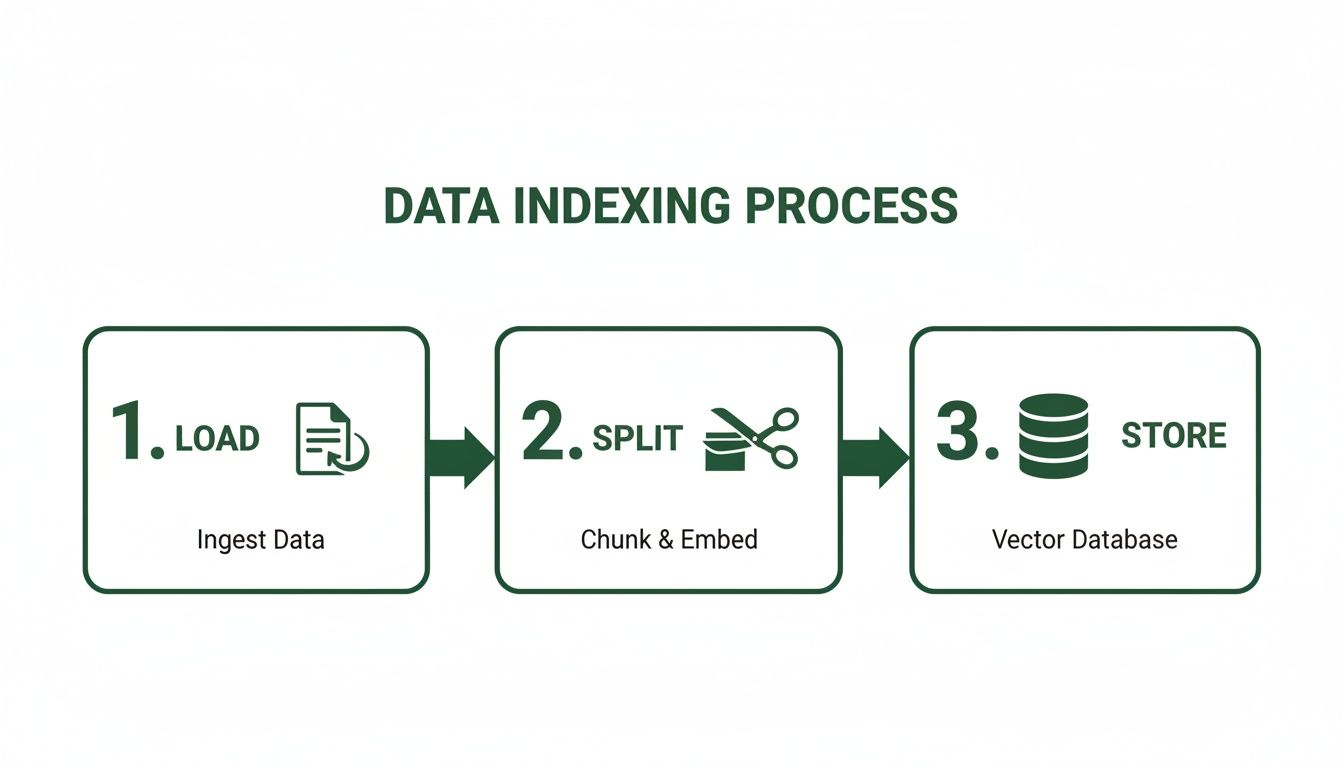
As you can see, after loading and splitting your documents, the crucial 'store' phase is the perfect time to attach that filterable metadata. Doing so makes each chunk infinitely more valuable for retrieval down the line.
LangChain's vector store integrations are at the heart of a huge shift in AI development. The market, currently valued at around USD 4.8 billion, is projected to rocket to USD 30 billion with a CAGR over 23%. For developers, this means the pressure is on to build smarter systems. Enriching chunks with summaries and schemas to supercharge filtering is key, as it preserves crucial data traceability.
Metadata filtering is the bridge between a prototype and a production-ready RAG system. It offers the surgical precision needed to build reliable, trustworthy AI applications that can navigate complex information landscapes with confidence.
Implementing Metadata Filters in LangChain
Putting this into practice with LangChain's retriever objects is surprisingly straightforward. Most vector store integrations support a search_kwargs parameter where you can pass a dictionary of your metadata filters.
For example, when setting up your retriever, you could specify:
'source': 'internal_wiki/q3_earnings_call.pdf''doc_type': 'financial_report''created_at': {'$gte': '2023-07-01'}
This tells the retriever to first narrow the search space down to only the chunks that match these exact criteria. Only then does it perform the semantic similarity search on that smaller, more relevant pool of candidates. The result? Faster and dramatically more accurate retrieval.
Tools like ChunkForge are built to make this easy by automatically generating rich, filterable metadata while you're preparing your documents. By building a high-quality, metadata-rich knowledge base from the start, you set yourself up for advanced, precise retrieval later on. If you want to learn more, our guide on how to build a knowledge base offers practical steps.
Preparing Documents for Better Retrieval
The performance of your RAG system isn't really decided by your LLM or even your LangChain vector store alone. It's forged much earlier, during document preparation. How you break down your raw files into chunks directly dictates the quality of context your system can retrieve and work with.
Think of it like preparing ingredients for a master chef. If you just randomly hack up the vegetables, the final dish will be a mess, no matter how skilled the chef is.

This is exactly what happens with naive chunking—a common pitfall where developers just split a document every 500 characters. This clumsy approach almost always results in fragmented sentences, lost headers, and orphaned context. When an LLM gets these disjointed fragments, it has no hope of providing a coherent, accurate answer.
Before you even think about ingesting documents, you need a solid parsing strategy. For tricky formats like PDFs, mastering the PDF parser to convert PDFs to structured data is a critical first step that pays huge dividends in retrieval quality later on.
Actionable Chunking Strategies for RAG
The solution is to move beyond simple, fixed-size splits. You need to adopt more context-aware chunking strategies that create chunks that are semantically complete units of information.
- Fixed-Size Chunking: This is the most basic method, just splitting text by a set character count. It's fast, but it constantly breaks sentences mid-thought, destroying the context. Actionable Insight: Use this only as a baseline. To improve, add significant overlap (e.g., 20-30%) to ensure some context is retained between chunks.
- Semantic Chunking: This is a much smarter technique that uses embedding models to find the natural semantic boundaries in the text. It groups related sentences together, making sure each chunk represents a whole idea—which is exactly what you want for high-quality retrieval.
- Heading-Based Chunking: For structured documents like reports or web pages, splitting your content based on headers (H1, H2, etc.) is a fantastic way to preserve the document's natural hierarchy. Actionable Insight: Attach the heading text as metadata to each child chunk. This allows you to filter or boost results based on document sections.
The core problem with naive chunking is structural loss. When you chop structured documentation into arbitrary fragments, you lose the headers, subsections, and hierarchy that give the content its meaning. Effective preparation isn't about retrieval; it's about giving the agent direct access to that existing structure.
Visualizing and Enriching Your Chunks
Honestly, the best way to get better at chunking is to see what you're doing. Tools built for this can give you a visual overlay, mapping each chunk back to its source pages so you can instantly spot bad splits and verify you're preserving context.
This screenshot from ChunkForge shows how a visual interface can help you inspect and refine document chunks. You can immediately see the problem areas.
The key insight here is being able to confirm that each chunk is a self-contained, meaningful unit before it ever gets near your vector store.
But it’s not just about splitting. You should also enrich each chunk with metadata—like summaries, keywords, or source information. This turns each little piece of data into a highly retrievable asset.
By making sure every chunk ingested into your LangChain vector store is optimized, you build a solid foundation for accurate, context-aware retrieval. And that's how you build truly reliable AI systems.
Frequently Asked Questions
Once you’ve got your LangChain vector store up and running, the real work begins. Moving from a quick prototype to a production-ready application brings a new set of questions about performance, maintenance, and getting the best possible results.
Let’s dig into some of the most common challenges developers run into. Getting these details right is what separates a decent Retrieval-Augmented Generation (RAG) system from a truly great one that users can trust.
Which Embedding Model Should I Use?
There's no single "best" model, and anyone who tells you otherwise is selling something. The right choice completely depends on your specific data, performance needs, and budget. Your goal is to choose the model that best captures the nuances of your domain.
Your main decision point is between proprietary and open-source models:
- Proprietary Models: Services like OpenAI's
text-embedding-3-smallgive you top-tier performance with minimal fuss. They're a fantastic starting point when you want to get moving quickly without managing your own infrastructure. - Open-Source Models: Models from the Sentence-Transformers library, like
all-MiniLM-L6-v2, are powerful, free alternatives you can run yourself. For many general-purpose tasks, their performance is more than good enough.
Actionable Insight: Don't just pick one. Evaluate multiple models against a small, representative "golden dataset" of queries and expected document results from your own data. The MTEB (Massive Text Embedding Benchmark) leaderboard is a good starting point, but your own data is the ultimate test.
How Do I Keep My Vector Store Up to Date?
A static knowledge base is a dead knowledge base. If your source data changes, your langchain vector store needs to change with it, or your RAG system will quickly become unreliable and start hallucinating outdated information.
The standard way to handle this is with an incremental indexing pipeline. The idea is simple: build a process that monitors your source documents for any additions, updates, or deletions.
When a change is detected, your pipeline should automatically kick off a job to re-embed the new content. Using a unique ID for each document, you can then tell the vector store to overwrite the old vectors with the new ones or just delete them. Thankfully, most LangChain vector store integrations have built-in helper functions that make these updates pretty straightforward.
What Is the Difference Between Similarity Search and MMR?
Both are ways to pull documents, but they solve different problems and can give your LLM wildly different kinds of context. Choosing the right one is a key lever for improving retrieval.
Similarity Search is your default, go-to retrieval method. It’s a straightforward hunt for document chunks whose embeddings are the closest mathematical match to your query. The problem? Sometimes the top five results are just slight variations of the exact same point, which isn't very helpful for the LLM.
Maximal Marginal Relevance (MMR) is the more sophisticated alternative. It’s designed to balance two things at once: relevance and diversity. MMR starts by finding a large batch of relevant documents, but then it picks results that are different from each other. This is incredibly useful when you want to give the LLM a broader perspective from different corners of your knowledge base instead of just hammering the same point home.
Actionable Insight: Use similarity search when you need the single best answer. Use MMR when the query is broad and could benefit from multiple, diverse perspectives to synthesize a comprehensive response. Experiment with the
lambdaparameter in MMR to tune the balance between relevance and diversity for your specific use case.
Ready to perfect your document preparation and create retrieval-ready assets for your RAG pipeline? ChunkForge provides the visual tools and advanced chunking strategies you need to build a high-quality knowledge base. Start your free trial and see the difference.