
Python API Google Drive: A Guide to RAG Retrieval Optimization
Explore the python api google drive to authenticate, manage files, and build effective RAG pipelines for fast document retrieval.

Connecting your Python script to Google Drive is the foundational step in building an automated Retrieval-Augmented Generation (RAG) pipeline. To optimize for retrieval, you need to go beyond basic connections. It starts with choosing between OAuth 2.0 and Service Accounts for security, enabling the API in your Google Cloud project, and installing the google-api-python-client library. Let's build a connection architected for high-quality RAG.
Why a Direct Drive Connection Is Crucial for RAG
Before you can chunk documents or populate a vector database, your RAG system needs a secure and efficient bridge to its knowledge source. For many organizations, that source is Google Drive. A direct python api google drive integration is the engine that powers your RAG system's knowledge ingestion, letting you programmatically pull, manage, and enrich the documents that form the basis of your AI's intelligence.
This connection is more than just downloading files. It's about building an automated workflow that directly improves retrieval quality by:
- Continuously scanning for new or updated documents to keep your knowledge base fresh and prevent model hallucination.
- Extracting text and metadata on the fly, enriching your data with contextual cues before it gets vectorized.
- Organizing files based on processing status, creating a clean, auditable data pipeline from
_to_processto_processed. - Managing permissions programmatically, ensuring your RAG system only accesses the information it's supposed to.
This API-first approach transforms manual file handling into a scalable, automated pipeline. This is a foundational concept when you how to build a knowledge base designed for high-performance RAG.
Understanding Your Authentication Options
Picking the right authentication method is the most critical decision you'll make at this stage. Your choice boils down to how your application will interact with user data.
- OAuth 2.0 Client IDs are for apps that act on behalf of a user. Think of a tool that helps someone organize their own Google Drive. The user has to grant explicit permission through a pop-up consent screen.
- Service Accounts are for apps that act on their own behalf. This is the go-to choice for a backend RAG pipeline that runs on a server, autonomously processing documents in a shared, company-owned Drive folder.
For most RAG systems, a Service Account is the way to go. It operates without any human intervention, making it perfect for automated, server-side tasks like a nightly document ingestion script.
A Service Account is essentially a robot user with its own identity. You grant it specific permissions to a folder in Google Drive, and it can then access those files 24/7 without needing a human to log in. This is the key to building a truly autonomous RAG pipeline.
Choosing Your Google Drive API Authentication Method
The right authentication flow is critical for your RAG application's security and functionality. This table breaks down the key differences to help you decide.
| Consideration | OAuth 2.0 Client ID | Service Account |
|---|---|---|
| Use Case | App acts on behalf of a specific logged-in user (e.g., "Organize my Drive"). | Backend server or script acts on its own (e.g., company-wide document processing). |
| User Interaction | Required. User must go through a consent flow in their browser. | None. Runs autonomously in the background. |
| Best For | User-facing applications, web apps. | RAG ingestion pipelines, cron jobs, server-side automation. |
| Data Access | Can access any file the user has permission to see. | Can only access files/folders explicitly shared with the service account's email address. |
| Credential Type | client_secret.json and a user-specific refresh token. | A single, downloadable JSON key file. |
For a standard RAG pipeline that processes documents from a central, shared Drive folder, the Service Account is almost always the correct and more straightforward choice.
Preparing Your Google Cloud Environment
Before you write a single line of Python, you need to set up your Google Cloud project. This is a one-time task that authorizes your script to talk to Google's services.
First, head over to the Google Cloud Console and either select an existing project or create a new one. From there, find the "APIs & Services" dashboard and click "Enable APIs and Services." Search for the Google Drive API and enable it for your project.
Next, you'll create your credentials. If you're going the Service Account route, you'll generate a new service account, give it a role (start with "Viewer" to be safe), and download a JSON key file.
Treat this JSON file like a password. It contains the private key your application will use to prove its identity. Store it securely and never, ever commit it to a public Git repository. This file is the final piece of the puzzle you need to start building your Python connection.
Mastering File Operations for Your RAG Corpus
Once your authentication is locked in, you can begin interacting with the files that will become the knowledge corpus for your Retrieval-Augmented Generation (RAG) system. Working with the Google Drive API is about more than just file transfer; it's about programmatically preparing your documents to maximize retrieval accuracy.
Think of it this way: the right API calls can transform a messy folder into a clean, organized, and AI-ready dataset. The real leverage for RAG comes from using the API to find the right documents, move them securely, and enrich them with the context your retrieval model needs to succeed.
Executing Powerful Search Queries
You can't process a file you can't find. The Drive API’s search feature is incredibly robust, letting you build complex queries to pinpoint exactly the documents your RAG system needs. This pre-filtering is a critical first step for efficient retrieval.
Instead of pulling a list of every single file and filtering it in Python, you can offload that work to the API. It's far more efficient and drastically reduces data transfer and local processing.
You build a query string (q) using a specific syntax. Here are a few examples that are immediately useful for RAG workflows:
mimeType='application/pdf' and 'folderId' in parents and trashed = false: Finds every non-deleted PDF inside a specific folder. Simple and effective.name contains 'report' and modifiedTime > '2023-10-01T12:00:00Z': Grabs any file with "report" in its name that’s been touched since a specific date and time, crucial for keeping the knowledge base current.properties has { key='status' and value='unprocessed' }: A game-changer for retrieval. It finds files based on custom metadata you've assigned, enabling a structured ingestion workflow.
Resiliently Handling Large Files
RAG systems thrive on deep knowledge, which often comes from large documents—think detailed financial reports or massive research papers that can easily be 50-100 MB or more. A simple upload can time out from a momentary network glitch, leading to an incomplete knowledge base.
This is exactly why resumable uploads exist.
This multi-step process allows your script to pick up an upload right where it left off after an interruption. While more complex to implement than a simple upload, it is non-negotiable for any production-grade ingestion pipeline. It ensures your system can reliably handle the high-value, information-dense documents that are critical for accurate retrieval.
Managing Metadata for Smarter Retrieval
Programmatically managing metadata is one of the most impactful things you can do to boost your RAG system's retrieval performance. Metadata provides the context that retrieval models crave. The Drive API lets you attach custom key-value properties to any file, effectively turning your Google Drive into a queryable, structured data source for your documents.
Imagine adding tags like:
'status': 'processed''source': 'marketing_department''needs_review': 'true'
This metadata-first approach enables sophisticated retrieval workflows. Your Python script can search for all files with 'status': 'unprocessed', feed them into your chunking and embedding pipeline, and then update their status to 'processed'. More importantly, you can use this metadata at query time as a pre-filter. A user's query can be augmented to first search for documents from a specific team or with a certain classification, drastically narrowing the search space for the vector database.
By treating file metadata as a first-class citizen, you're not just storing files; you're creating a structured, queryable knowledge base. This directly translates to more precise context being fed to your language model, which results in more accurate and relevant answers.
This strategy also streamlines the early stages of data prep. For instance, once you've used a query to find a batch of new PDFs, the next step is getting the text out. For a closer look at that part of the process, our guide on extracting text from PDFs using Python provides actionable code and techniques that slot right into this workflow. By combining smart search, metadata tagging, and efficient text extraction, you build an ingestion pipeline that's not just automated, but truly intelligent.
Building a Production-Ready RAG Ingestion Pipeline
Moving from a quick script to a production-grade system uncovers new complexities. A simple file-handler is fine for a dozen documents, but what happens when your Retrieval-Augmented Generation (RAG) system needs to ingest thousands of files from Google Drive? You need a resilient and scalable approach.
This is where you graduate from basic API calls to building a true ingestion pipeline. A production system must reliably manage permissions, process massive volumes of files, and gracefully handle API rate limits. Getting these details right is what separates a fragile script from a stable document workflow that consistently feeds your RAG knowledge base.
This diagram lays out the core flow for a RAG-focused ingestion process.
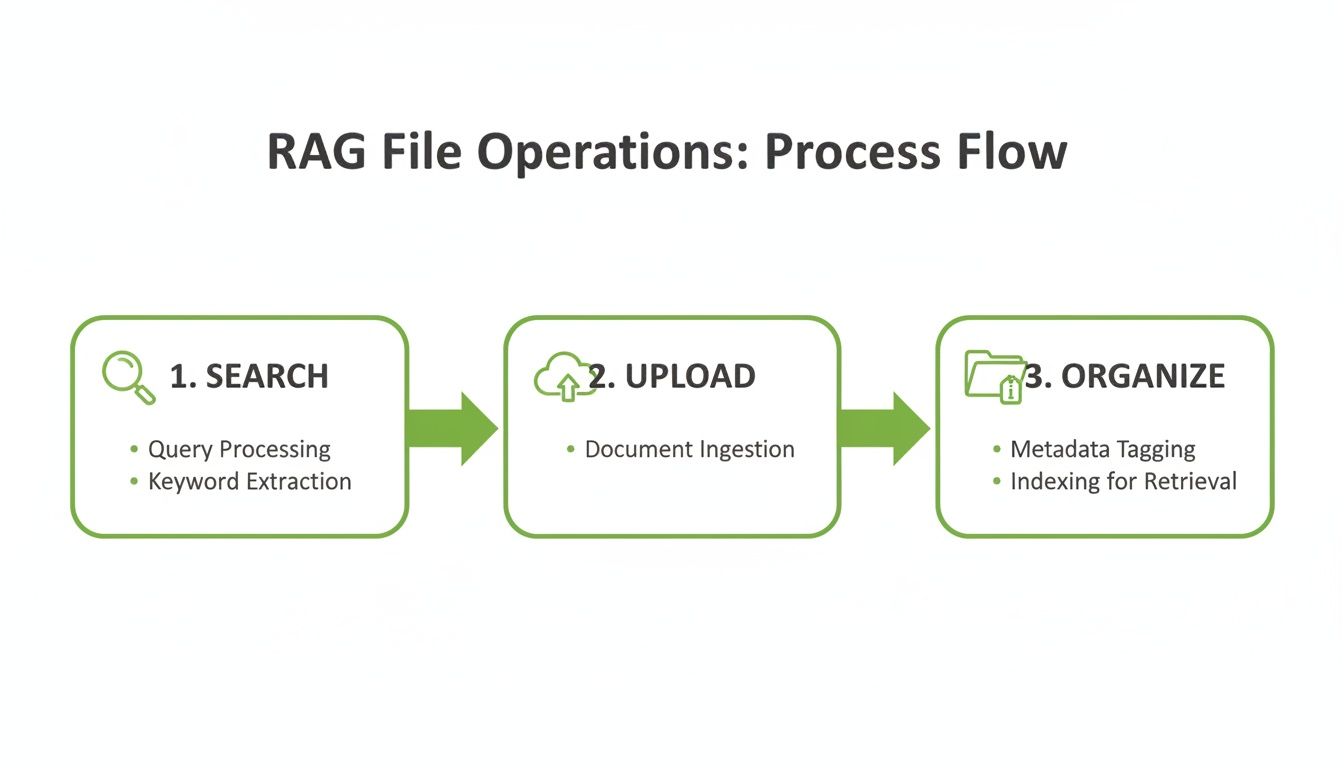
It’s a simple but powerful cycle—Search, Upload, and Organize—that forms the backbone of any automated document management system you build with the API.
Programmatically Managing Permissions
In any real-world setting, not all documents are created equal. Your RAG system will likely need to grab files from various teams, some of which might be sensitive. Hardcoding permissions is neither scalable nor secure. Your application must manage file access on the fly.
Using the permissions.create method, your Python script can dynamically grant access to your service account or other users. A common pattern for RAG ingestion involves a "staging" folder where users drop new documents. From there, your script can:
- Grant itself temporary editor access to a new file.
- Process the file—chunking, embedding, and storing in a vector database.
- Move the processed file to an "archived" folder.
- Revoke its own permissions to maintain a clean security footprint.
This ensures your system has exactly the access it needs, precisely when it needs it, without leaving any security doors wide open.
Conquering API Pagination
When you request a list of files from a folder holding thousands of documents, the Google Drive API paginates the results. You'll typically get about 100 items back, along with a nextPageToken. Ignoring this token is a common mistake that leads to an incomplete knowledge base.
Your ingestion script absolutely must check for that nextPageToken in every list response. If it’s there, you must make another request, passing that token to fetch the next batch. You repeat this in a loop until the token is no longer returned, ensuring you've retrieved every single file.
Forgetting to handle pagination is like reading the first page of a book and assuming you know the whole story. Your RAG system will have massive blind spots, leading to incomplete answers simply because it never saw the documents on page two.
Navigating Rate Limits with Exponential Backoff
Every robust API has usage limits, and the Google Drive API is no different. If you make too many requests too quickly, you'll get hit with a 403 User rate limit exceeded error, which can halt your ingestion pipeline.
The professional approach is to implement exponential backoff. This strategy involves retrying a failed request after a brief pause and systematically increasing that pause with each subsequent failure.
For instance, Google Workspace users have an upload cap of 750 GB per day, and while the request rate limit is high, aggressive polling can trigger a 403 error. The recommended backoff strategy is to wait 1 second + a random number of milliseconds, then double the wait time on each retry (2s, 4s, 8s, and so on) up to a maximum. This ensures your pipeline is robust and can recover from temporary load issues without manual intervention.
By combining smart permission management, proper pagination, and intelligent error handling, you can build a truly resilient RAG pipeline that reliably turns your Google Drive into a powerful, AI-ready knowledge base.
Improving RAG Retrieval with Custom Metadata
The quality of your Retrieval-Augmented Generation (RAG) system comes down to one thing: its ability to find the right context, fast. Integrating with the python api google drive isn't just about moving files; it’s an opportunity to enrich your documents before they are chunked or vectorized. By embedding structured metadata directly into your files, you build a much smarter, more filterable knowledge base from the start.
Think of this as creating a pre-filter for your vector search. Instead of solely relying on semantic similarity across your entire corpus, your RAG system can first drastically narrow the search to a small, highly relevant subset of documents using these metadata filters. The result? Faster, more accurate, and more contextually aware answers from your language model.
Attaching Custom Properties to Files
Google Drive lets you attach custom key-value pairs to any file through the properties field. This is your secret weapon for storing structured data that describes a document’s content, origin, or purpose, which is fully accessible and searchable through the API.
This metadata can give your RAG system a critical edge. You could programmatically add properties like:
doc_summary: A quick, AI-generated summary of the document.author_department: The source team, like 'Legal' or 'Engineering'.creation_year: The year the information is relevant to—critical for time-sensitive questions.classification: A tag for the document type, like 'Technical Manual' or 'Quarterly Report'.
This metadata becomes a powerful first-pass filter. If a user asks, "What were the engineering team's key findings in 2023?", your retrieval logic can first use the API to grab all documents where author_department is 'Engineering' and creation_year is '2023'. Only then does it need to perform the more intensive vector search on that much smaller, pre-qualified set of files.
Monitoring Your Ingestion Pipeline
A production-scale RAG system is a living entity. As you add more documents, you need to know how your ingestion pipeline is performing. Bottlenecks, errors, and high latency can starve your system of fresh knowledge, leading to stale and inaccurate answers.
The Google Cloud API Dashboard gives you a direct window into your integration's performance. Watching your python api google drive usage reveals crucial metrics: requests per second, error rates, and median latency. This data is gold for optimizing your pipeline. A sudden spike in 429 errors tells you you're hitting rate limits and your backoff strategy needs tuning. High latency on files.get calls for large files might indicate a need for a different processing strategy. One media company used this exact approach to cut their content publishing time by 40%, a gain that came directly from optimizing based on these metrics. You can learn more about how to monitor Google Cloud APIs to keep your own system running smoothly.
Keeping a close eye on API health isn't just about preventing downtime. It's about ensuring the timely flow of information into your RAG system, which directly impacts the freshness and relevance of its responses. A slow or error-prone pipeline means your AI is working with outdated information.
By pairing rich, custom metadata with diligent performance monitoring, you build a far more intelligent and reliable foundation for your RAG system. You give it the tools to not just find information, but to understand the context behind it, leading to a massive improvement in retrieval quality.
Real-World RAG Automation Scenarios
<iframe width="100%" style="aspect-ratio: 16 / 9;" src="https://www.youtube.com/embed/sVcwVQRHIc8" frameborder="0" allow="autoplay; encrypted-media" allowfullscreen></iframe>Let's see how this works in practice. Why are companies automating Google Drive for their Retrieval-Augmented Generation (RAG) systems? Because it’s where they achieve significant business impact by improving information retrieval.
This is about turning a chaotic document repository into a structured, AI-ready knowledge base. Using the python api google drive, businesses build complete workflows that automate ingestion, enrich documents with critical metadata, and pipe that clean data directly into their RAG systems for superior retrieval.
Let’s look at two scenarios where this approach is a complete game-changer.
Automating Financial Document Verification
Imagine a financial firm processing loan applications. Each application dumps new PDFs—pay stubs, bank statements—into a shared Google Drive folder. Manual verification is a bottleneck, slow and prone to human error.
This is a prime candidate for a RAG automation pipeline designed for accuracy.
A Python script with a service account monitors the "incoming applications" folder.
- File Identification: The script runs a targeted search query for files with custom metadata like
{'status': 'pending_review'}. This organizes the workflow and prevents redundant processing. - Data Extraction: Once flagged, the script downloads the file, extracts raw text, and identifies key-value pairs like "Applicant Name" or "Annual Income."
- AI-Powered Validation: The extracted information is fed to the RAG system. It cross-references the data against a knowledge base of lending policies and compliance rules to flag discrepancies or risks, providing a more reliable verification than keyword matching alone.
- Status Update: The script then updates the file's metadata in Google Drive to
{'status': 'verified'}or{'status': 'requires_manual_review'}and moves it to the appropriate folder.
What was a multi-hour manual task becomes a consistent, automated process. This not only speeds up processing but also improves the accuracy of the initial verification step, leading to better decision-making downstream.
The real win here is consistency. An automated system applies the same rigorous validation logic to every single document, 24/7, eliminating the variability and fatigue that inevitably come with manual review.
Building a Corporate Legal Knowledge Base
Consider a corporate legal team whose Google Drive holds decades of contracts and case files. Answering "What are our termination rights in contracts signed with vendor X before 2020?" requires a time-consuming manual search.
To solve this, the team built a specialized RAG system on top of their Drive repository.
A Python script ingests every document, attaching a rich layer of metadata to each file:
- Contract Type: 'MSA', 'NDA', 'SOW'
- Counterparty: The other company's name.
- Effective Date: The day the agreement started.
- Governing Law: The relevant jurisdiction.
Now, when a lawyer asks the RAG system a question, the retrieval process begins with a highly filtered search using the python api google drive. It can instantly narrow tens of thousands of documents to a small, relevant handful based on metadata before the vector search even begins.
This metadata pre-filtering is incredibly efficient for retrieval. For example, a logistics company saw a 70% reduction in invoice processing time by automating data extraction from their daily Drive uploads. This mirrors what we see in finance, where automated document verification for thousands of loan applications has cut manual handling errors by up to 80%. You can learn more about how these integrations are built by exploring GCP fundamentals and the Drive API.
By strategically using the API for metadata-driven pre-filtering, the team ensures their language model gets clean, hyper-relevant context, enabling it to provide instant, accurate answers to complex legal questions.
Common Questions About the Google Drive API for Python
When pulling documents from Google Drive for a Retrieval-Augmented Generation (RAG) system, a few common questions always pop up. Getting these sorted out early on saves a ton of headaches and helps you build a more reliable, cost-effective pipeline.
Let's walk through the big ones developers usually ask, from costs and frustrating auth errors to which Python library is the right tool for the job.
Is the Google Drive API Free to Use?
This is usually the first question on everyone's mind, and the answer is almost always a resounding yes. For the vast majority of RAG projects, using the Google Drive API is completely free. Google’s free tier is incredibly generous—more than enough for most development and even many production-level systems.
The standard API gives you a default quota of 1 billion requests per day, a ceiling you're just not going to hit. Even specific actions like file uploads have high daily limits (e.g., 750 GB for Workspace users) that can handle huge document ingestion jobs without breaking a sweat.
The bottom line is this: for a typical RAG pipeline that searches, downloads, and manages metadata for thousands of documents, you'll operate comfortably within the free quotas. Cost should be the last of your worries.
Troubleshooting Common Authentication Errors
Authentication is the first hurdle where most developers trip. A cryptic error can stop you in your tracks for hours, but nearly all of them trace back to a handful of simple misconfigurations.
Here are the culprits you're most likely to see and how to fix them fast:
error: "invalid_grant": This almost always points to an issue with your refresh token in an OAuth 2.0 flow. It might have expired (they do after six months of inactivity) or the user revoked access. If you're using a service account, it often means your server's clock is out of sync. Make sure it's synchronized with an NTP server.error: "unauthorized_client": This one’s straightforward. The client ID in your request doesn't match the one in your Google Cloud project. Double-check yourcredentials.jsonfile—you're probably using credentials from a different project than the one where you enabled the Drive API.Error 403: The user has not granted the app {appId} access: If you’re using OAuth, this error means the user either hasn't completed the consent screen or you're asking for permissions (scopes) they didn't approve. Make sure your requested scopes, likehttps://www.googleapis.com/auth/drive.readonly, perfectly match what your application actually needs.
Comparing Client Libraries
While google-api-python-client is the official, do-everything library from Google, it’s not your only option. A few other libraries offer a cleaner, more "Pythonic" feel that many developers find more intuitive for common tasks.
| Library | Key Strengths | Best For |
|---|---|---|
| google-api-python-client | Official support, access to every API feature, maintained by Google. | Complex RAG pipelines needing advanced search, metadata, and permissions. |
| PyDrive2 | Simplified syntax, object-oriented file handling (drive.CreateFile()). | Rapid development and simpler scripts focused on basic file uploads and downloads. |
| pydrive2-gs | A modern, better-maintained fork of PyDrive2 with solid service account support. | Developers who like the PyDrive style but need reliable service account auth for a RAG pipeline. |
My advice? For most heavy-duty RAG systems that depend on advanced search and deep metadata extraction, sticking with the official google-api-python-client is the safest bet. But if you're just writing a quick script to batch-download files, a wrapper like pydrive2-gs can get you there much faster.
Transforming raw documents into high-quality, retrieval-ready assets is the most critical step in building an effective RAG system. ChunkForge provides a complete contextual document studio to accelerate this process, allowing you to visually inspect, chunk, and enrich your data with the deep metadata needed for precise retrieval.
Start your 7-day free trial and experience a faster path from PDF to production at https://chunkforge.com.