
A Developer's Guide to Building Advanced RAG with LangChain
Build production-ready RAG systems with LangChain. This guide covers advanced retrieval techniques, actionable code examples, and optimization strategies.
So you want to build an application that lets an LLM answer questions about your company’s internal documents. The problem? The base LLM, whether it's from OpenAI, Anthropic, or somewhere else, knows absolutely nothing about your private PDFs, Confluence pages, or Slack history.
This is exactly the problem that Retrieval-Augmented Generation (RAG) was designed to solve. And LangChain has emerged as the essential toolkit for developers building these RAG systems, providing actionable tools to dramatically improve retrieval performance.
What Is LangChain and Why It Matters for RAG

Think of LangChain not as a single, monolithic platform, but as a modular library of building blocks. It provides the plumbing to connect a powerful engine (the LLM) to a vast, custom library (your data), allowing them to work together seamlessly.
It gives you standardized, high-level interfaces for all the tedious parts of building an AI workflow, from loading documents to managing conversation history. The key is that these components directly enable you to fine-tune your retrieval process for maximum accuracy.
The Orchestrator for Complex AI Workflows
If you tried to build a RAG pipeline from scratch, you'd quickly find yourself tangled in a web of custom scripts. You need to load documents, split them into manageable pieces, turn them into vector embeddings, stuff them into a vector database, and then orchestrate the whole retrieval and generation dance for every single query. It’s a ton of work.
LangChain simplifies all of this by providing battle-tested components for each step. Its meteoric rise in popularity, marked by over 115,000 GitHub stars, shows just how badly developers needed this kind of infrastructure. It's become one of the most foundational open-source projects in the AI space.
LangChain's magic lies in its philosophy: abstraction without restriction. It lets you quickly assemble a working RAG pipeline with high-level components. But when you need to improve retrieval accuracy, you can dive deep and customize every single part, from the chunking strategy to the retrieval algorithm.
This modularity is a lifesaver. Is your first vector database not cutting it? Swap it out for another one with just a few lines of code. This ability to rapidly experiment and fine-tune is what separates a mediocre RAG system from a great one.
For a deeper look into how these systems function, our guide on Retrieval-Augmented Generation breaks down the entire process.
Solving Common RAG Development Challenges
Engineers building RAG systems almost always run into the same roadblocks, especially around retrieval quality. LangChain anticipates these issues and offers specific modules designed to solve them, providing actionable levers to pull for better performance.
Here’s a quick look at some of those common pain points and how LangChain’s components provide a ready-made solution for improving your RAG system's retrieval capabilities.
Common RAG Challenges and LangChain Solutions
| RAG Challenge | Core LangChain Component | Actionable Insight for Better Retrieval |
|---|---|---|
| Ingesting diverse data formats (PDF, TXT, HTML) | DocumentLoaders | Provides dozens of loaders to read and parse data from virtually any source, ensuring clean data ingestion which is the first step to good retrieval. |
| Inefficient or inconsistent data splitting | TextSplitters | Offers multiple strategies (e.g., recursive, semantic) to chunk documents effectively, which is critical for embedding relevance and retrieval accuracy. |
| Managing complex multi-step processes | Chains & LCEL | Lets you compose sophisticated retrieval flows, such as adding a re-ranking step after the initial vector search to improve precision. |
| Finding relevant documents for a query | Retrievers & VectorStores | Creates a clean interface to fetch the most relevant documents, with advanced options like multi-query and self-querying retrievers to enhance search capabilities. |
By offering these components off-the-shelf, LangChain lets you focus on the unique logic of your application instead of reinventing the wheel on foundational tasks.
To get a RAG application humming with LangChain, you have to get your hands dirty with its core building blocks. These aren't just abstract ideas—they're the actual gears and levers you'll use to wire up a language model to your own data for superior retrieval.
Nailing this setup is the difference between a chatbot that gives you vague, generic fluff and one that delivers sharp, context-aware answers pulled directly from your documents.
Think of it like building a custom PC. You don't just grab a random motherboard and CPU. You pick each component for a specific job. LangChain gives you a workshop full of these specialized parts, all designed to snap together.
The Blueprint and The Assembly Line
At the heart of any LangChain app, you'll find two key organizers: PromptTemplates and Chains.
A PromptTemplate is basically your architectural blueprint. It’s a reusable, predefined structure for how you'll ask the LLM questions. Instead of winging it and writing a new prompt every time, you create a template with placeholders for things like the user's query and the documents you've fetched. This keeps everything consistent and makes it way easier to tweak your prompting strategy later.
If the template is the blueprint, then Chains are the assembly line. You use the LangChain Expression Language (LCEL) to pipe all your components together in a logical sequence. LCEL makes it dead simple to define a clear, step-by-step flow: a question comes in, it hits a retriever, the retrieved docs get formatted into your prompt template, and the whole package is finally sent off to the LLM.
The magic of LangChain’s design is how modular it is. You can start simple with a basic vector store and embedding model, then easily hot-swap them for more powerful options later without tearing down your entire application. This "plug-and-play" feel is perfect for experimenting and improving over time.
VectorStores: The Digital Library
Before you can retrieve anything, you need a place to put it. That’s what VectorStores are for. A VectorStore is a specialized database built to store and search through vector embeddings—the numerical fingerprints of your documents.
Imagine a huge library where books aren't sorted by title, but by the ideas inside them. Books on "financial risk" are physically right next to books on "market volatility," even if their titles are nothing alike. That's exactly what a VectorStore does for your data. It organizes your document chunks by semantic meaning, which makes finding the right context incredibly fast.
A few popular VectorStore integrations you'll see in LangChain are:
- Chroma: An open-source, in-memory vector database that's perfect for quick prototypes and smaller projects.
- Pinecone: A managed, cloud-native vector database designed for high-performance, massive-scale applications.
- FAISS: A library from Meta AI that gives you blazing-fast similarity search, often used when you're hosting everything yourself.
Before any of this retrieval can happen, it's crucial to prepare your data sources. Concepts like intelligent document processing, which uses AI to pull structured data from messy documents, are key here. A well-organized VectorStore always starts with well-processed documents.
Retrievers: The Expert Researcher
If the VectorStore is the library, the Retriever is the expert researcher who knows exactly which aisle to run down. It's an interface that takes a user's question, turns it into an embedding, and then uses that vector to find the most similar document chunks in the VectorStore.
The retriever's entire job boils down to one word: relevance. It's the part of the system responsible for grabbing the exact snippets of information the LLM needs to actually answer a question correctly. LangChain provides a few different types, each offering an actionable strategy to improve retrieval:
- Standard Vector Store Retriever: This is the workhorse. It does a straightforward similarity search and is what you'll use most of the time.
- Multi-Query Retriever: An actionable technique to improve recall. It takes a user's question and spins up several different versions from various angles to cast a wider net and find more comprehensive results.
- Self-Query Retriever: A powerful method for structured data. It uses an LLM to pull filters out of the user's natural language query. So, a query like "summaries about LangChain from last month" gets translated into a search for content and a metadata filter for the date.
Together, these components—PromptTemplates, Chains, VectorStores, and Retrievers—form the backbone of any serious RAG system in LangChain. Understanding how they click together is the first real step toward building apps that can genuinely reason over your private data.
Building Your First Production-Grade RAG Pipeline
Alright, let's move past the theory and get our hands dirty. This is where LangChain really starts to shine—when you stitch together its components to build something real. We're going to walk through building a solid, functional Retrieval-Augmented Generation (RAG) pipeline from scratch using Python.
The goal is to assemble the core pieces we've talked about into a system that can actually read, understand, and answer questions about your own documents.
Everything starts with the data. The quality of your retrieval is only as good as the quality of your document chunks, so that’s our first stop. From there, we'll step through each critical stage, complete with code snippets and plain-English explanations. By the end, you'll have a working architecture you can adapt for your own projects.
This simple flowchart shows the basic RAG process in LangChain. It’s a great visual for how a user's prompt gets beefed up with relevant info from a retriever before the final answer is generated.
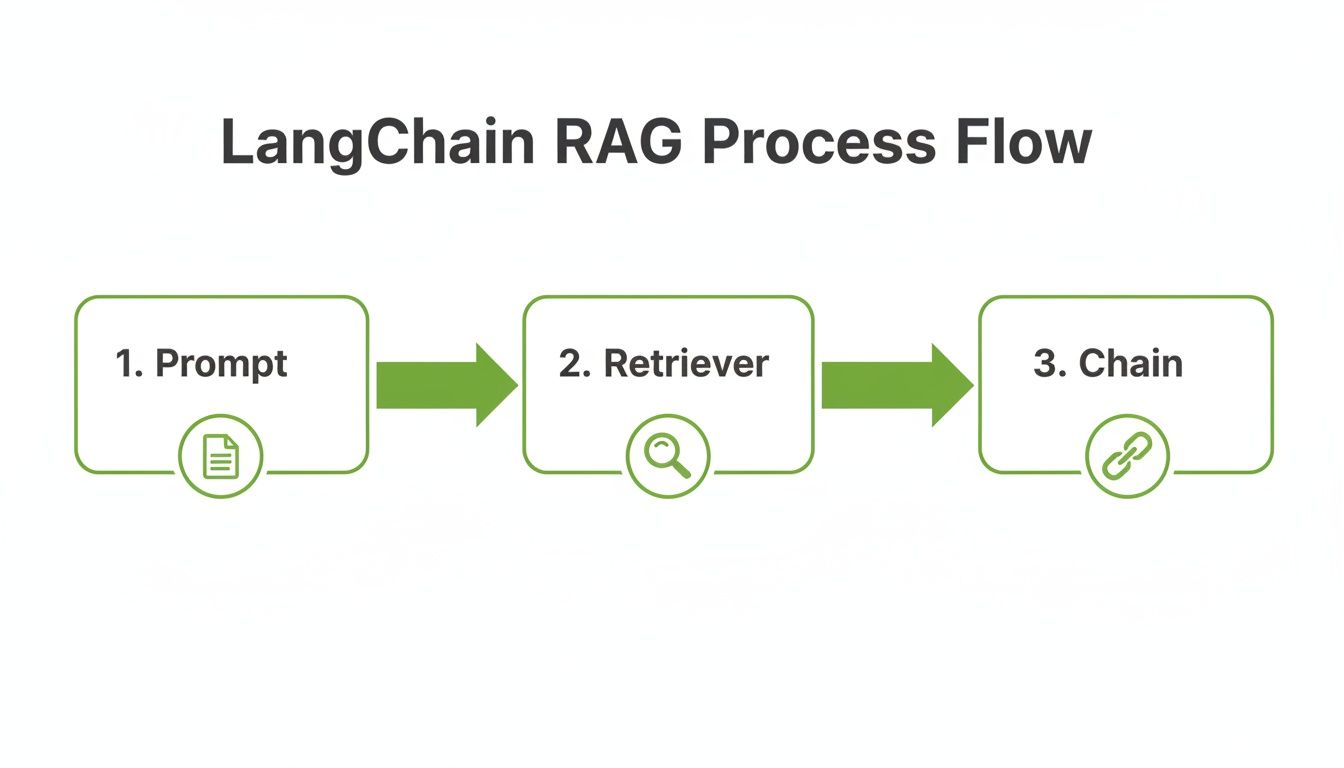
This picture nails the core idea of any RAG system: augmenting the input with context. It's a linear, but incredibly powerful, sequence.
Step 1: Load Your Documents
First things first, you have to get your data into the system. Whether you're dealing with PDFs, raw text files, or scraped web pages, you need a way to load it all into a format LangChain understands. This is exactly what DocumentLoaders are for; they handle the messy parts of parsing different file types for you.
For this example, we’ll keep it simple and start with a basic text file.
from langchain_community.document_loaders import TextLoader

# Point the loader to our source document
loader = TextLoader("./your_document.txt")

# Load the content into memory
documents = loader.load()
That’s it. This small piece of code cracks open the file and loads its contents into a list of Document objects. Now our text is prepped for the next step.
Step 2: Chunk the Text for Optimal Retrieval
Here’s a rookie mistake I see all the time: feeding an entire document into an embedding model. Don't do it. You'll just dilute the semantic meaning and get terrible retrieval results. The right way is to break the document into smaller, more focused pieces using a TextSplitter.
A smart chunking strategy is absolutely critical for retrieval accuracy. The RecursiveCharacterTextSplitter is a go-to choice for many because it’s clever about how it splits, trying to break on natural boundaries like paragraphs or sentences first.
from langchain.text_splitter import RecursiveCharacterTextSplitter

# Set up a splitter with a defined chunk size and overlap
text_splitter = RecursiveCharacterTextSplitter(chunk_size=1000, chunk_overlap=200)

# Split the loaded documents into chunks
texts = text_splitter.split_documents(documents)
In this snippet, chunk_size sets the max character length for each chunk, while chunk_overlap creates a small bridge between consecutive chunks to make sure you don't lose context right at the split. The quality of this step has a massive impact on your retrieval accuracy.
For a much deeper dive, checking out a comprehensive https://chunkforge.com/blog/rag-pipeline can give you some great ideas for fine-tuning your chunking strategy based on what kind of documents you have.
Step 3: Create Embeddings and Store Them
Now that our text is nicely chunked, we need to convert each piece into a list of numbers—an embedding. These vectors are what capture the meaning of the text, which allows us to find similar chunks later. Of course, before you can do this, you’ll need API access to an embedding model, which involves legitimately obtaining an OpenAI API key or a similar service.
Once we have the embeddings, we need to stash them somewhere for fast lookups. That's the job of a VectorStore. For getting started, the open-source library Chroma is a fantastic choice.
from langchain_openai import OpenAIEmbeddings
from langchain_community.vectorstores import Chroma

# Fire up the embedding model
embeddings = OpenAIEmbeddings()

# Create a vector store from our chunks and their embeddings
vector_store = Chroma.from_documents(texts, embeddings)
This code does all the heavy lifting: it initializes the OpenAI embedding model, generates a vector for every text chunk, and then loads them into a Chroma vector database for indexing.
Step 4: Build the Retriever and Chain
Our knowledge base is now indexed and ready to be queried. But we need a component that can actually search it. A Retriever is that component. It takes a user's query, embeds it, and then fishes out the most relevant document chunks from our VectorStore.
With the retriever ready, we can finally tie everything together with a Chain. The RetrievalQA chain is a super convenient, high-level tool that handles the entire RAG workflow. It takes a query, uses the retriever to fetch relevant context, and then passes both to an LLM to cook up the final answer.
from langchain.chains import RetrievalQA
from langchain_openai import OpenAI

# Make our vector store searchable by turning it into a retriever
retriever = vector_store.as_retriever()

# Create the final RetrievalQA chain
qa_chain = RetrievalQA.from_chain_type(
    llm=OpenAI(),
    chain_type="stuff",
    retriever=retriever
)
The
"stuff"chain type is the most straightforward option. It literally "stuffs" all the retrieved documents into the prompt. It works great for a small number of documents, but for larger amounts of retrieved text, you might want to look into other types like"map_reduce"or"refine"that have smarter strategies.
And just like that, you have a fully functional RAG pipeline. You can now call qa_chain with a question, and it will orchestrate the entire dance of retrieving context and generating a grounded, accurate response.
Advanced Strategies to Improve Retrieval Accuracy

Getting your basic RAG pipeline up and running is just the first step. The real work starts when you need to move from a proof-of-concept to a production system that users can actually trust. This is all about nailing the retrieval step.
Your LLM is a brilliant expert, but its output quality is entirely dependent on the context it receives. The retriever's job is to act as a research assistant, finding the perfect briefing documents. If that briefing is sloppy or incomplete, the final answer will be too. This is where you separate a good RAG system from a great one.
This is also where the power of LangChain really shines. The framework gives you a whole toolkit of actionable strategies to fine-tune how your system finds and prioritizes information, which is the absolute key to cutting down on hallucinations and building user confidence.
Mastering Context With Sophisticated Chunking
We've talked about simple text splitting, but production-grade systems demand a much smarter approach. Honestly, how you chunk your documents is probably the single biggest lever you can pull to improve retrieval quality.
Naive, fixed-size chunking is a recipe for disaster. It often slices sentences in half or separates a critical idea from its context, leading to irrelevant or confusing search results.
LangChain helps you move beyond that with strategies that keep the meaning of your data intact. An actionable insight is to use semantic chunking, which groups text by conceptual relatedness instead of just counting characters. Another is to structure retrieval around your document’s hierarchy—using headings and subheadings to create rich, self-contained chunks. These methods ensure that the snippets your retriever finds actually make sense on their own. Digging into how structured data helps this process with knowledge graph RAG methodologies can take this even further.
The goal is to create chunks that are atomically useful. Each one should contain enough context to answer a potential question without needing its neighbors.
Query Transformations for Deeper Understanding
Sometimes, the user’s question isn't the best thing to search for directly. A short or ambiguous query might not have enough semantic juice to find the most relevant documents in your vector store. This is where query transformations come in, an actionable technique to tweak the user's input to make it far more effective for retrieval.
One of the most powerful techniques in LangChain is HyDE (Hypothetical Document Embeddings). Instead of embedding the user's raw query, HyDE first asks an LLM to generate a hypothetical answer. It then embeds that generated answer and uses the resulting vector for the search.
The logic is brilliant: this fake answer is likely to be semantically much closer to the real answer documents in your database. This trick works wonders, especially for niche topics where a user's phrasing might not match the source text at all.
Re-Ranking for Precision at the Final Mile
Your standard vector search gets you a list of potential documents, but it’s not always perfect. It might pull up a handful of decent candidates, but the single best one could be buried at position five. Re-ranking is a critical post-processing step that acts as a second, more discerning filter.
Here’s the actionable two-step dance:
- Broad Retrieval: First, the retriever fetches a larger-than-needed batch of documents (say, the top 20).
- Precision Re-Ranking: Then, a second, more specialized model—often a cross-encoder— meticulously re-evaluates just that small set.
- Final Selection: The re-ranker re-orders the documents based on a much more precise relevance score, and you pass only the absolute best (e.g., the new top 3) to the LLM.
This approach dramatically boosts precision. The initial retrieval is a fast, wide net, while the re-ranker is a detail-obsessed final inspector. LangChain makes it simple to plug in re-rankers from providers like Cohere, adding a powerful layer of quality control right before the final answer is generated.
To help you decide which technique to focus on, here's a quick comparison of these advanced methods.
Comparison of Advanced Retrieval Techniques
| Technique | Primary Benefit | Implementation Complexity | Best For |
|---|---|---|---|
| Semantic Chunking | Preserves context and meaning within chunks | Medium | Complex, unstructured documents with shifting topics. |
| Query Transformation | Improves retrieval for ambiguous or short queries | Low to Medium | Q&A systems where user questions may lack detail. |
| Re-Ranking | Increases precision by adding a second validation step | Medium | Applications requiring the absolute highest accuracy. |
| Knowledge Graphs | Leverages structured relationships for precise lookups | High | Domains with well-defined entities and relationships. |
Each of these strategies offers a different way to tackle the core challenge of RAG: getting the right context to the LLM. Choosing the right one depends entirely on your specific documents and what your users are trying to accomplish.
As these systems become more common, getting this right is more important than ever. A LangChain-sponsored survey found that 51% of AI professionals already have AI agent systems in production. This shows a massive demand for reliable systems that can handle real work, and advanced retrieval is the foundation for that reliability. Implementing these techniques isn’t just an academic exercise—it’s a necessity for building AI that meets today's business demands.
Troubleshooting Common RAG and LangChain Issues
Building a retrieval-augmented generation system with LangChain is never a one-shot deal. It’s an iterative process, and you’re absolutely going to hit roadblocks where the output just isn't what you expect. Think of this section as your field guide for squashing the most common bugs developers run into when trying to improve retrieval.
<iframe width="100%" style="aspect-ratio: 16 / 9;" src="https://www.youtube.com/embed/3YXFcnSLN40" frameborder="0" allow="autoplay; encrypted-media" allowfullscreen></iframe>Your RAG pipeline is really just a chain of dependencies. A small problem in an early step, like retrieval, will cascade downstream and create a mess by the end. In fact, most issues that look like a "bad LLM response" actually start with a failure to retrieve the right information.
Get the retrieval step right, and you're 90% of the way to a reliable, accurate application. Let's break down the most frequent problems and give you actionable steps to fix them.
Why Are My Retrievals Irrelevant?
This is, without a doubt, the number one issue. The LLM generates a perfectly plausible but completely wrong answer because the retriever fed it junk documents. The root cause almost always boils down to one of three things: your chunking, your embeddings, or the query itself.
Your first suspect should always be your chunking strategy. If your chunks are too big, they're too general and lack focus. If they're too small or split awkwardly, they lose the context needed to make sense.
- Look at Your Chunks: Use a tool like ChunkForge to actually see how your documents are getting split. Are sentences being sliced in half? Are paragraphs that belong together now in separate chunks?
- Match Chunking to Your Content: For structured documents with headings and sections, use a heading-based or semantic chunking approach to keep related ideas together. For dense, uniform text, a recursive character splitter might work better.
- Play with Size and Overlap: Experiment with smaller chunk sizes to get more focused, precise retrievals. Then, try increasing the overlap between chunks to make sure you’re not losing important context at the boundaries.
If your chunks look solid, the next place to investigate is your embedding model and query. A mismatch here can kill your similarity search results.
An embedding model is like a translator converting text into the language of math. If your query and your documents are translated using different dialects, their meaning gets lost in translation.
How Can I Reduce Hallucinations?
Hallucinations—when the LLM confidently makes things up—are often just a symptom of bad retrieval. The model invents an answer because you didn't give it the correct information to build a factual one. The best cure is almost always to improve retrieval.
The goal is to achieve better grounding. You want the retrieved context to be so relevant and complete that the LLM has no reason to go off-script.
- Refine Your Prompt Template: Be explicit. Tell the model in your prompt to only use the information you provide. A simple directive like,
"Answer the question based solely on the following documents. If the information is not in the context, say you don't know."works wonders. - Bring in a Re-Ranker: Add a second layer of validation. A retriever might pull in ten potentially relevant documents, but a re-ranker can analyze that smaller set and push the top two or three most relevant ones to the front. This gives the LLM a much cleaner, more focused context to work with.
What Is Making My Pipeline So Slow?
Performance bottlenecks can absolutely kill the user experience. In a RAG pipeline, the usual suspects are the vector search and the LLM generation step. You'll need to look at the latency of each component to figure out where the slowdown is.
Vector database performance is a common culprit, especially as you scale. A similarity search that’s instant with 10,000 vectors can become painfully slow with 10 million.
- Optimize Your Vector Indexing: Make sure your vector database is properly indexed for fast lookups. Different databases (Pinecone, Weaviate, or Chroma) have different indexing strategies (like HNSW or IVF) that you can tune for speed.
- Filter Before You Search: If your documents have metadata, use it. Filtering on metadata before running the vector search dramatically narrows the search space, reducing the number of vectors the system has to compare.
How Do I Manage Conversational History?
For any kind of chatbot, forgetting what was just said is a recipe for a terrible user experience. LangChain handles this with its Memory modules, which are designed to store and manage the history of a conversation.
The ConversationBufferMemory is a great place to start. It simply stores all the messages and stuffs the entire history back into the prompt for the next turn. But for longer conversations, this can quickly exceed the model's context window.
When that happens, you can switch to more advanced memory types.
ConversationSummaryMemory: This uses an LLM to create a running summary of the conversation, which keeps the context concise and relevant.ConversationBufferWindowMemory: A simpler approach, this just keeps the lastkinteractions, preventing the context from growing forever.
Plugging in the right memory module is key to making your app feel intelligent and capable of handling a natural, multi-turn dialogue.
Common Questions About LangChain and RAG
When you start building a Retrieval-Augmented Generation (RAG) system with LangChain, a few questions pop up again and again. Let's tackle some of the most common ones I hear from engineers to clear up any confusion and get you on the right track.
Can I Use LangChain with My Own Private Documents?
Yes, absolutely. In fact, this is one of the main reasons LangChain is so popular for building RAG systems. It’s designed from the ground up to connect your private data sources to LLMs.
LangChain comes with a huge library of DocumentLoaders that can pull in data from just about anywhere—PDFs, raw text files, Notion pages, you name it. The typical workflow is to load your documents, split them into sensible chunks, and then index those chunks in a vector store. By wrapping this all up in a retrieval chain, you give an LLM the power to answer questions using your specific knowledge base, effectively turning a generalist model into a specialist.
What's the Difference Between a LangChain Agent and a Chain?
Getting this right is key to picking the right tool for the job. Think of a Chain as a fixed, predictable assembly line. A standard RAG chain, for instance, always follows the same steps: retrieve relevant documents, then pass them to an LLM to generate an answer. It’s simple, reliable, and perfect for straightforward tasks.
An Agent, on the other hand, is like a smart assistant with a toolbox. It uses an LLM as its brain to decide which tool to use and in what order. Those tools could be a retriever, a calculator, or an API call. The path an Agent takes isn't predetermined; it changes based on the user's question.
For a classic RAG task where the flow is always "retrieve then generate," a Chain is exactly what you need. If you're tackling more complex problems that might require multiple steps or different tools to figure out the answer, an Agent gives you that crucial flexibility.
How Do I Choose the Right Chunking Strategy?
There’s no magic bullet for chunking—the best strategy depends entirely on your documents. Your goal is always the same, though: create chunks that are self-contained enough to make sense on their own.
Making the right choice here is critical for good retrieval. Here’s a quick rundown of your options:
- Fixed-Size Chunking: This is the easiest approach, but it's often a bad idea. It just chops up text every N characters, which can slice sentences and ideas right in half, destroying context.
- Recursive Character Splitting: A much better default. This method tries to split text along natural breaks like paragraphs or sentences first. It’s a solid starting point for most unstructured text.
- Contextual Chunking: For the best results, especially with well-structured documents, you'll want to use methods like Heading-based or Semantic chunking. These strategies group text by topic or meaning, ensuring every chunk is a logical, complete piece of information.
Take a close look at your documents and don't be afraid to experiment. The quality of your chunks has a direct impact on how relevant your search results are and, ultimately, how accurate your RAG system is.
Ready to perfect your chunking strategy and build a high-performing RAG pipeline? ChunkForge provides the visual tools and contextual controls you need to create retrieval-ready chunks from any document. Start your free trial at chunkforge.com.