
What Is a RAG Pipeline Your Guide to Building Smarter AI
Discover what is a RAG pipeline and why it's the key to smarter AI. This guide explains how retrieval-augmented generation works, from ingestion to response.
A Retrieval-Augmented Generation (RAG) pipeline is a system that gives a Large Language Model (LLM) access to an external, up-to-date knowledge base. It's the difference between a closed-book and an open-book exam. Instead of forcing the model to rely solely on its training data, RAG lets it look up relevant facts before answering a question.
This simple yet powerful trick makes AI responses far more accurate, trustworthy, and less likely to "hallucinate" or make things up.
What Is a RAG Pipeline and Why Is It Essential?
At its core, a RAG pipeline empowers an LLM to ground its answers in specific, verifiable data. Think of a standard LLM as a brilliant student who has read millions of books but can't check any of them during a test. A RAG pipeline hands that student a library card, allowing them to pull the right book off the shelf and find the exact detail needed.
This is the key to building reliable AI applications, from customer support bots to internal knowledge management systems. It's a concept explored in guides on how to build an AI to answer questions directly from your documents.
The industry has taken notice. The global RAG market, valued at USD 1.2 billion in 2024, is expected to skyrocket to USD 11.0 billion by 2030. Enterprise adoption is exploding, too—51% of enterprise AI systems now use RAG, a massive jump from just 31% in 2023.
The entire process boils down to two main phases: preparing the knowledge and then using it to answer questions.
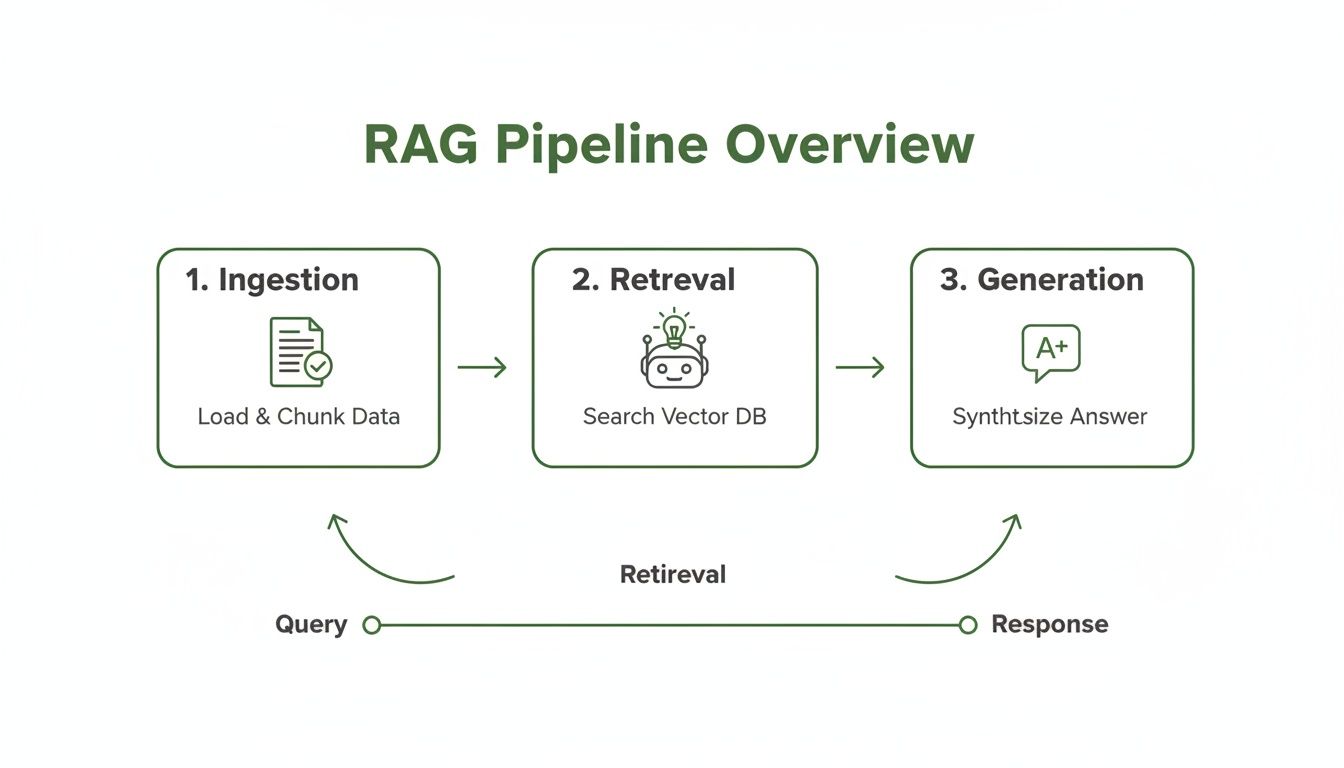
This diagram shows the clear separation between the offline "Ingestion" stage and the real-time "Retrieval & Generation" stage. These two halves form the complete foundation of any RAG system.
The Two Phases of a RAG Pipeline
Every RAG pipeline operates in two distinct phases that work together to deliver factually grounded answers. Grasping these stages is the first step toward building and fine-tuning your own system.
For a complete breakdown, you can read our detailed guide on Retrieval-Augmented Generation.
To make it even clearer, let's break down what happens in each phase. The table below gives a high-level overview.
The Two Phases of a RAG Pipeline at a Glance
| Phase | Primary Goal | Key Activities |
|---|---|---|
| Ingestion (Offline) | Prepare and index your knowledge base for fast search. | Document loading, chunking (splitting text), embedding (converting text to vectors), and storing in a vector DB. |
| Retrieval & Generation (Online) | Answer a user's query using the indexed knowledge. | Retrieving relevant chunks based on the query, augmenting the prompt with context, and generating a final answer. |
Let's unpack what each of those activities means in practice.
-
Ingestion Phase: This is all the prep work, done offline before any user asks a question. You feed the system your documents—PDFs, web pages, Notion docs, you name it. The pipeline breaks them into smaller, digestible "chunks," converts those chunks into numerical representations called embeddings, and stores everything in a specialized vector database. Think of it as creating a hyper-efficient, searchable index for your library.
-
Retrieval and Generation Phase: This is the real-time magic. When a user asks a question, the pipeline first searches the vector database to find the most relevant chunks of information. It then takes this retrieved context, combines it with the original question, and hands it all to the LLM. The LLM uses this rich, focused context to generate a coherent, accurate, and source-based answer.
Building the Knowledge Base: The Ingestion Phase
A RAG pipeline is only as smart as the knowledge you give it. The ingestion phase is where the magic really starts—it’s the offline process where you turn a pile of raw documents into a structured, searchable library for your AI. This isn't just about uploading files. It's about strategically preparing your data so the AI can find exactly what it needs, when it needs it.
The whole thing kicks off with a crucial step called chunking. Instead of trying to make an AI read a 100-page PDF all at once, we break it down into smaller, bite-sized pieces. The goal is to create chunks small enough for the AI to process quickly but large enough to hold onto their original meaning.

This initial prep work is everything. To get it right, it helps to apply proven knowledge management best practices. This ensures your data stays organized and useful as your knowledge base grows.
Choosing Your Chunking Strategy
Not all chunking methods are created equal. The right approach really depends on your document's structure and the kinds of questions you expect users to ask. Get this wrong, and you'll end up with fragmented context, making it nearly impossible for the AI to find a coherent answer.
Let's break down the most common strategies:
- Fixed-Size Chunking: This is the most basic method. You simply slice the document into chunks of a set length, say, every 500 characters. It's easy, but it’s clumsy—often cutting sentences and ideas right in half, destroying the context.
- Paragraph Chunking: A much smarter approach that splits the document at natural paragraph breaks. This does a way better job of keeping complete thoughts together and is a solid starting point for well-structured text like articles or reports.
- Semantic Chunking: This is the advanced play. It uses an embedding model to group sentences by their meaning, even if they aren't next to each other in the text. It creates chunks based on concepts, which is incredibly powerful for pulling specific information out of dense material.
A pro tip for any strategy is to use overlap. This means each new chunk starts with a small piece of text from the end of the previous one. It creates a smoother transition between ideas and prevents you from losing important context that falls on the edge of a chunk.
A Practical Comparison of Chunking Methods
Deciding on a strategy is all about balancing simplicity against accuracy. You don't always need the most complex method if a simpler one does the job for your specific data.
The table below breaks down the key differences to help you choose the right approach for your project.
Comparison of Chunking Strategies for RAG
| Chunking Strategy | How It Works | Best For | Potential Pitfall |
|---|---|---|---|
| Fixed-Size | Splits text into equal-length segments based on character or token count. | Simple, unstructured text where sentence breaks are less critical. | Often breaks sentences mid-thought, losing context. |
| Paragraph | Splits text at every new paragraph, respecting the author's intended structure. | Well-formatted documents like articles, reports, and books. | Can create very large or very small chunks. |
| Semantic | Groups sentences based on their conceptual similarity using embedding models. | Complex, dense documents where ideas are spread across paragraphs. | Computationally more intensive and harder to debug. |
After you've picked a strategy, you'll still need to tinker with settings like chunk size and overlap. There’s no magic number here. It all depends on your LLM’s context window and how dense your documents are. The best way forward is to experiment and see what works.
Enriching Chunks with Metadata for Better Retrieval
Once your documents are chunked, the next move is metadata enrichment. This is where you add descriptive tags to each chunk, which acts like a superpower for filtering during retrieval. Think of it as adding a detailed card catalog entry to every single paragraph in your library.
By attaching structured metadata—such as source document, creation date, author, or topic—to each chunk, you enable highly specific, filtered searches that dramatically reduce retrieval noise and improve accuracy.
Here are some actionable ways to use metadata to boost retrieval:
- Source Information: Tag each chunk with its original filename, page number, and section heading. This enables traceability, allowing the AI to cite its sources and building user trust.
- Generated Summaries: Use a fast LLM to generate a one-sentence summary for each chunk. Embed this summary along with the chunk content to give the retriever extra conceptual context during the search.
- Custom Business Tags: Apply your own labels relevant to your operations, like
{"department": "HR", "document_type": "policy", "year": 2024}. This allows for powerful pre-filtering. A user can ask, "What was the HR policy on remote work in 2024?" and the system can filter the search space before performing the vector search, making retrieval faster and far more accurate.
This process transforms your raw text into a smart, queryable knowledge base. If you're looking to go deeper, our guide on how to build a knowledge base walks through more detailed steps.
Putting in the effort on smart chunking and rich metadata is what separates a mediocre RAG pipeline from one that delivers consistently accurate and relevant answers.
Mastering Retrieval and Reranking for Better Answers
With your knowledge base prepped and indexed, the RAG pipeline is armed and ready to tackle questions. This is where the magic really happens—the real-time hunt for the perfect snippets of information to answer a user's query. Think of it as your AI becoming a master librarian, instantly navigating a massive library to pull the exact paragraph needed, not just the right book.
The whole dance starts with a user's question. Just like we did with our documents, the RAG system converts this query into a numerical vector using the very same embedding model. This vector is a mathematical representation of the question's meaning, which lets the system search for concepts, not just keywords.

This new query vector is then shot over to the vector database. The system instantly compares it against all the chunk vectors it has stored, calculating the semantic similarity to find the chunks that are conceptually closest to what the user is asking.
The Role of the Retriever
The component handling this high-speed search is called the retriever. Its entire job is to fetch the top k most relevant chunks from the database. You get to decide what k is—maybe the top 5, or the top 10. The performance of this initial retrieval step is absolutely critical. Get it wrong, and the rest of the pipeline doesn't stand a chance.
Here are the most effective retrieval strategies you can implement:
- Semantic Search: The standard vector-based approach. It excels at understanding user intent and finding conceptually related information, even with different wording.
- Keyword Search: A classic search (like TF-IDF or BM25) for exact word matches. It's essential for queries containing specific jargon, product codes, or names that semantic search might misinterpret.
- Hybrid Search: The most robust solution. It combines semantic and keyword search, running them in parallel and then intelligently fusing the results. This approach provides a safety net, ensuring you get the best of both worlds—conceptual understanding and keyword precision.
The retriever you choose directly dictates what information the LLM gets to see. A good one will surface the precise context needed for a great answer. A bad one introduces "retrieval noise"—irrelevant junk that confuses the LLM and leads it astray.
Taming Retrieval Noise with a Reranker
Even the best retrievers aren't perfect. They might pull in five fantastic chunks but also a few that are only vaguely related. If you feed that mixed bag of quality directly to the LLM, you're asking for a mediocre, or even wrong, response.
This is where a reranker saves the day. A reranker is a second, more powerful model that acts as a quality control filter. It takes the initial list of retrieved chunks (say, the top 20) and scrutinizes them with a much finer-toothed comb.
A reranker goes beyond simple similarity. It assesses the direct relevance of each chunk to the specific user query. Its only job is to promote the absolute best results to the top and shove the noise to the bottom.
Imagine the retriever doing a quick, broad search to gather a pool of promising candidates. The reranker then steps in to conduct a detailed interview with each one, finding the absolute perfect fit for the job.
By using a reranker, you can afford to cast a wider net initially (retrieving more documents to ensure you don't miss anything) and then use the reranker to surgically trim that list down to only the most potent passages for the LLM. This two-step process dramatically boosts the signal-to-noise ratio.
Why High-Quality Retrieval Is Non-Negotiable
For AI engineers building systems that have to work with messy, real-world data, getting retrieval and reranking right is everything. Irrelevant chunks are poison for LLMs, causing what some call "pseudo-helpfulness"—answers that sound confident but are completely wrong.
A 2024 NAACL study ran 1,620 experiments and confirmed this, finding that even mighty LLMs like GPT-4 stumble without a high-quality retriever. While getting the right "gold" document into the context helped, the noise from fetching the top 20 results caused base Llama2 models to repeat themselves up to 3x more often. The research makes it clear: better retrieval tactics slash errors and seriously boost performance. You can read more about the findings on RAG retrieval challenges.
This hammers home a core principle: your RAG system's final output is capped by the quality of the information it retrieves. You can't generate a right answer from the wrong context.
Here are actionable steps to immediately improve your retrieval quality:
- Implement Hybrid Search: Don't rely solely on semantic search. By adding a keyword-based component (like BM25), you create a safety net for queries with specific terms that vector search alone might miss. This is often the first and most impactful upgrade.
- Add a Reranking Step: This is a crucial upgrade. Use a dedicated reranking model (like Cohere Rerank or a cross-encoder) to re-evaluate the top
kresults from your initial retrieval. This filters out noise and ensures the LLM receives only the most relevant context. - Tune Your
kValue: Experiment with the number of documents you retrieve (k). A highly effective pattern is to retrieve a largerk(e.g., 20-50) in the initial step and then use a reranker to select the top 3-5 to pass to the LLM. - Leverage Metadata Filters: Use the metadata you added during ingestion. If a query mentions a specific year or department, pre-filter your search to only include chunks with matching tags. This drastically narrows the search space, improving both speed and accuracy.
Mastering retrieval and reranking is the difference between simply finding related documents and strategically curating the perfect context to generate answers that are precise, helpful, and trustworthy.
Generating Accurate and Trustworthy AI Responses
So, your RAG pipeline has done the heavy lifting and pulled the most relevant bits of information from your knowledge base. Now comes the magic moment: turning those retrieved facts into a coherent, accurate answer. This is the generation phase, where we move from simply finding information to using it.
This final step is far more than a simple copy-and-paste job. It’s a carefully orchestrated process of prompt engineering. The pipeline doesn't just dump a pile of text on the LLM and hope for the best. Instead, it meticulously crafts a detailed prompt that guides the model, telling it exactly how to synthesize the retrieved context with the user's original question.

Think of it like briefing a research assistant. You wouldn't just hand them a stack of articles. You'd give them clear instructions: "Using only these sources, answer this specific question. And be sure to cite exactly where you found each piece of information." That's precisely what a RAG pipeline does for an LLM.
Crafting the Perfect Prompt Template
The engine of this generation phase is the prompt template. This is a pre-defined structure that wraps the user’s query and the retrieved chunks into a neat package before sending it off to the LLM. A solid template is your primary tool for controlling the model's output and making sure it plays by your rules.
A battle-tested prompt template often looks something like this:
"You are a helpful assistant. Use the following pieces of context to answer the user's question. If you don't know the answer from the context provided, just say that you don't know. Do not make up an answer.
Context: {retrieved_chunks}
Question: {user_question}
Answer:"
This template is doing a few critical jobs at once:
- Sets the Persona: It tells the LLM to act as a "helpful assistant," not a creative writer.
- Grounds the Response: It forces the model to base its answer only on the provided context.
- Prevents Hallucination: Crucially, it gives the LLM an "out"—permission to admit "I don't know" if the answer isn't in the sources. This is a game-changer for reliability.
By fencing the LLM in this way, you gain massive control over the final output. This is absolutely essential for business applications where accuracy isn’t just a nice-to-have; it's non-negotiable.
The Business Value of Traceable Answers
This structured, grounded approach is what makes RAG so powerful for enterprises. It creates a clear chain of traceability for every answer. When a customer support bot gives a user an answer, it can also point directly to the page and paragraph in the user manual it came from. This builds immense trust and makes debugging a thousand times easier.
This is exactly why RAG has become the default for enterprise AI. Recent data shows that 51% of enterprise AI systems used RAG in 2024, a huge jump from just 31% the year before. Another study of 300 enterprises found that a staggering 86% now augment their LLMs with RAG, cementing its status as the go-to architecture for knowledge-intensive work.
It's about more than just finding documents; it's about creating a verifiable dialogue between a user and your company's knowledge. This same principle applies when working with more structured data, a technique we explore further in our article on implementing Knowledge Graph RAG systems. By fusing the conversational power of an LLM with the factual integrity of your own data, a RAG pipeline provides a clear, compelling answer to its own value.
Common RAG Pipeline Pitfalls and How to Fix Them
Getting a RAG pipeline up and running is a great first step. But making it work reliably in the real world? That’s where the real challenge begins. Even the most carefully designed system can trip up, spitting out irrelevant answers, missing crucial context, or just plain getting things wrong.
If you know where to look, you can build a truly robust and effective RAG system.
<iframe width="100%" style="aspect-ratio: 16 / 9;" src="https://www.youtube.com/embed/p09yRj47kNM" frameborder="0" allow="autoplay; encrypted-media" allowfullscreen></iframe>The good news is that most of these problems come from a handful of core areas. Once you learn to spot them, you can systematically debug your pipeline and turn that promising proof-of-concept into a production-ready powerhouse.
Pitfall 1: Poor Chunking Strategies
The most common point of failure I see is a bad chunking strategy. It’s that simple. If your chunks are too big, they’re full of noise that drowns out the important details. If they’re too small, you shatter the context, feeding the LLM disconnected fragments of sentences.
Think about what happens when a fixed-size chunker slices right through the middle of a table or a bulleted list. The relationship between the data points is instantly destroyed. The LLM has no chance of making sense of it.
A RAG pipeline’s performance is fundamentally capped by the quality of its chunks. No amount of downstream tuning can fix a broken context window caused by poor document splitting.
Actionable Solutions:
- Visualize Your Chunks: Don’t just guess. Use a tool like ChunkForge to get a visual overlay of how your documents are being split. It immediately shows you where ideas are being severed, so you can fix your strategy.
- Use Structure-Aware Chunking: Stop using one-size-fits-all methods. For articles and reports, try chunking by paragraphs or headings. For structured data like tables or code, you’ll need more specialized techniques.
- Tune Size and Overlap: Play around with your chunk size and overlap settings. A small overlap, maybe 10-15% of your chunk size, can act as a semantic bridge between chunks, helping to keep the context flowing across the breaks.
Pitfall 2: Weak or Mismatched Embedding Models
Not all embedding models are created equal. It's a huge mistake to grab a generic, off-the-shelf model and throw highly specialized or technical documents at it. The model simply won’t understand the nuances of your domain’s language, and it will start confusing distinct concepts.
This causes the retriever to fetch irrelevant documents because it can’t grasp the real meaning of the user’s query in your specific world. The LLM gets garbage in, and you get garbage out.
Actionable Solutions:
- Evaluate Domain-Specific Models: Look for embedding models that have been fine-tuned for your industry, whether it's finance, medicine, or law. Test a few different ones to see which performs best with your actual data.
- Implement a Reranker: This is a game-changer. Add a reranking model that acts as a second filter. It takes the retriever's first pass and re-evaluates the results with a more powerful, context-aware model. This ensures only the absolute best chunks make it to the LLM.
Pitfall 3: The “Lost in the Middle” Problem
Researchers have uncovered a funny quirk in how LLMs work called the "lost in the middle" problem. It turns out that models pay way more attention to information at the very beginning and very end of the context window. Any facts buried in the middle often get ignored.
So, if your retriever sends ten documents to the LLM and the most critical piece of info is hiding in the fifth one, there's a good chance the model will miss it entirely. The result? Incomplete or just plain wrong answers, even though the right information was technically there.
Actionable Solutions:
- Reduce the Number of Retrieved Documents: Be ruthless. Instead of passing 10-20 documents, use a reranker to find the top 3-5 most relevant chunks. Quality over quantity.
- Reorder Documents Strategically: After you’ve reranked your chunks, don’t just pass them along. Intentionally place the single most relevant document at the beginning or end of the prompt. This simple trick can dramatically improve the model’s ability to find and use the key facts.
Real-World RAG Use Cases and Essential Tools
Theory is great, but a RAG pipeline really proves its worth when it starts solving actual business problems. By connecting a powerful LLM to your company’s private data, you can build applications that deliver immediate, tangible value. This is where the modern RAG stack comes in, pulling together specialized tools for each step of the journey.
The path from a raw document to an intelligent answer depends on a whole ecosystem of coordinated tech. Frameworks like LangChain and LlamaIndex are the glue, providing the orchestration layer that ties all the different components together.
From there, you have a few core jobs handled by specific tools in the stack:
- Data Loaders: This is where it all begins. Connectors within LangChain and LlamaIndex pull in data from all sorts of places—think PDFs, Notion pages, Confluence wikis, or even straight from a database.
- Vector Databases: Once your data is chunked up and turned into embeddings, it needs a place to live. Vector databases like Pinecone, Weaviate, and Chroma are built specifically to store these vectors and run incredibly fast semantic searches.
- LLMs: At the very end of the line, a large language model generates the final, human-readable answer. This is where models from OpenAI (like GPT-4), Anthropic (like Claude 3), and various open-source alternatives do their magic.
Putting the RAG Stack into Action
With these tools in hand, you can build some seriously powerful, real-world solutions. Let's walk through a couple of common use cases to see how these parts work together in harmony. Think of these as a blueprint for your own projects.
Use Case 1: An Internal Knowledge Base for a Tech Company
Picture a fast-growing tech company. They have thousands of pages of internal docs scattered across Google Docs, Confluence, and Slack. New engineers are spending weeks just trying to find answers to basic questions about the codebase, deployment processes, and architectural standards. It’s chaos.
A RAG-powered internal knowledge base turns this messy information landscape into a centralized, conversational expert. It becomes the single source of truth that employees can just ask questions to in plain English.
Here’s a simplified look at how the pipeline works:
- Ingestion: A data loader pulls documentation from all the different sources. The text is then chunked by headings and subheadings to keep the original document structure intact.
- Retrieval: An engineer asks, "What are the security protocols for deploying a new microservice?" That query gets embedded and sent to a Pinecone vector database.
- Generation: The retriever instantly finds the top five most relevant chunks from various security policy documents. These are fed to an Anthropic Claude 3 model, which synthesizes the information into a clear, actionable checklist and even cites the source documents for verification.
Use Case 2: A Customer Support Chatbot for E-commerce
An e-commerce brand is getting buried under a mountain of repetitive customer support tickets. The same questions keep coming in about return policies, product specs, and shipping times.
A RAG chatbot can handle over 80% of these queries instantly. It connects directly to the company's product catalog, FAQ pages, and policy documents.
When a customer asks, "Can I return a final sale item?" the RAG pipeline retrieves the exact paragraph from the return policy. It then provides a clear, definitive "no" and helpfully cites the policy page. This frees up human agents to focus on the truly complex issues that need a human touch.
Common Questions About RAG Pipelines
As you start building, a few common questions always pop up. Here are some quick, practical answers to help you navigate the tricky parts of implementation.
Should I Use RAG or Fine-Tuning?
This is a big one. Both RAG and fine-tuning add new knowledge to an LLM, but they solve completely different problems.
Think of it this way: fine-tuning is like sending the model to school. You're fundamentally changing its internal knowledge and teaching it a new skill, a new writing style, or a deep understanding of a niche subject. On the other hand, RAG is like giving the model an open-book test—it doesn't change what the model knows, it just gives it a specific set of notes to reference for the exam.
Use RAG when you need your model's answers to be grounded in specific, verifiable documents that might change often. It's perfect for customer support bots or internal knowledge bases.
Use fine-tuning when you need to change the model's core behavior, tone, or personality.
What’s the Best Chunk Size?
There’s no magic number here. The right chunk size is a delicate balance that depends entirely on your documents and the LLM you’re using.
- Smaller chunks (think 100-250 tokens) are fantastic for precision. When a user asks a very specific question, a small, targeted chunk is more likely to be the perfect match. The downside? You can easily lose the surrounding context.
- Larger chunks (around 500-1000 tokens) hold onto more context, which is great for broader questions. But this can also introduce noise, making it harder for the LLM to pinpoint the exact answer within the text.
A good starting point is usually around 512 tokens with a 10% overlap. But don't just set it and forget it. The most important step is to actually look at your chunks. Are you slicing sentences in half? Are you separating a key idea from its explanation? Visual inspection is non-negotiable.
How Do I Know if My Pipeline Is Working?
Measuring performance is critical. You need to know if you're retrieving the right information and if the LLM is using it correctly. Focus on two main areas:
- Retrieval Quality: This is all about what your vector database returns. Look at metrics like Hit Rate (did the right document even show up in the results?) and Mean Reciprocal Rank (MRR) (how close to the top was the right document?).
- Generation Quality: This evaluates the final answer the user sees. Check for Faithfulness (is the answer sticking to the facts from the retrieved text?) and Answer Relevancy (does the answer actually address the user's original question?).
Can RAG Handle Real-Time Data?
Absolutely. To make this work, you need to build an automated ingestion pipeline. Whenever a new document is added or an existing one is updated, it should automatically kick off your workflow: chunking, embedding, and indexing into the vector database.
This keeps your knowledge base fresh and ensures the RAG system can always provide answers based on the latest and greatest information, whether it's from five minutes ago or five seconds ago.
Ready to perfect your ingestion process? ChunkForge gives you a visual studio to create RAG-ready chunks with precision. Experiment with multiple strategies, enrich your data with deep metadata, and export production-ready assets in minutes. Start your free 7-day trial and see the difference at https://chunkforge.com.