
A Developer's Guide to PDF Parsing Python for RAG
Master PDF parsing Python with our end-to-end guide. Learn to choose libraries, extract structured data, and create RAG-ready chunks for your AI.
If you're building a Retrieval-Augmented Generation (RAG) system, how you handle PDFs isn't just a technical detail—it's the whole game. The quality of your text extraction and chunking directly determines the precision of your retrieval, which in turn governs the accuracy of your AI's responses. Getting this right is non-negotiable for high-performing RAG.
Why High-Fidelity PDF Parsing Is Crucial For RAG
In any RAG pipeline, the quality of your retrieved context is everything. Think of your PDF collection as the foundational knowledge for an expert system. If that knowledge is garbled, unstructured, or missing key relationships, the entire system is compromised. Subpar PDF parsing is the silent killer of retrieval accuracy.
When the text you pull from a PDF loses its original structure, you are kneecapping your retrieval model before it even starts. Its ability to find the precise information needed to answer a query plummets. This isn't just about grabbing words; naive parsing methods butcher a document's layout, introducing critical errors that poison your vector database.
- Lost Tabular Context: Imagine a table of financial data. A naive parser might flatten it into a long, meaningless jumble of text and numbers. This makes it impossible for the retrieval system to find the answer to a query like, "What was the revenue in Q3?"
- Mangled Layouts: In two-column academic papers, a simple text dump can interleave lines from both columns, creating nonsensical sentences that mislead the retrieval model and result in irrelevant context being fetched.
- Ignored Metadata: Semantic cues like page numbers, headers, and section titles are gold for retrieval. They provide vital context for creating structured chunks and enabling filtered search. Discarding them severely limits your RAG system's capabilities.
The Downstream Impact On RAG Performance
These parsing failures trigger a catastrophic domino effect on retrieval.
Once your vector database is filled with this low-quality, poorly structured text, the retrieval step starts pulling up junk. This is the classic "garbage in, garbage out" problem. The LLM gets fed irrelevant or confusing context, and what does it produce? Answers that are inaccurate, incomplete, or worse, total hallucinations.
High-fidelity parsing isn't just about getting the words out. It's about preserving the document's soul—its semantic and structural integrity. For RAG, this means creating chunks that are not just text, but contextually rich artifacts that improve retrieval precision.
Ultimately, investing in a robust Python PDF parsing workflow is the most critical first step you can take. By ensuring the data flowing into your RAG pipeline is clean, structured, and contextually rich, you prevent downstream retrieval failures. The right Python tools and techniques transform messy PDFs into a reliable source of truth, empowering your RAG system to find the precise information needed for trustworthy responses.
Choosing Your Python PDF Parsing Toolkit
Picking the right Python library to parse your PDFs is a foundational decision that will make or break your RAG system's retrieval capabilities. This isn't just about grabbing the most popular tool; it's about matching the library's strengths to the structural complexity of your documents.
The choice you make here directly impacts the quality of the chunks you create. Some libraries are built for pure speed, blazing through simple text. Others are designed to meticulously understand complex layouts and preserve structural context—a crucial requirement for high-precision retrieval. For a RAG system, this decision can mean the difference between finding a needle in a haystack and just finding more hay.
The link between parsing quality and RAG performance isn't just theoretical. It's dramatic.
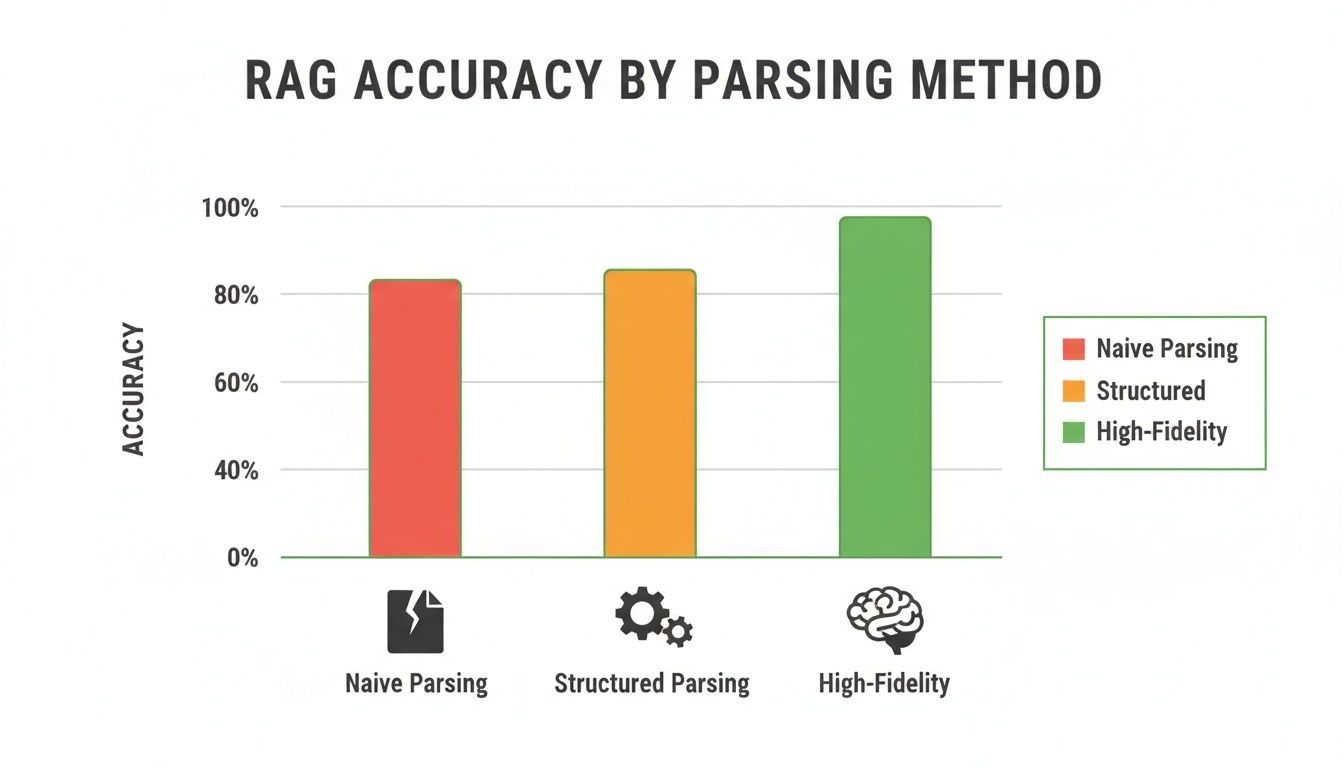
As you can see, jumping from naive text dumps to high-fidelity, structure-aware parsing gives you a massive boost in accuracy. This is a direct result of improved retrieval quality, which is why picking the right tool is so critical.
A Head-to-Head Look at the Top Contenders
To make this choice easier, let's break down the most popular libraries and see where each one excels. Think of this as your cheat sheet for building a parsing pipeline that maximizes retrieval relevance.
Python PDF Parsing Library Feature Comparison
| Library | Best For | Text Accuracy | Table Extraction | Image Extraction | Metadata Access |
|---|---|---|---|---|---|
| PyMuPDF (fitz) | High-speed, bulk processing of text-heavy PDFs. | Very High | Basic | High (Direct) | Excellent |
| pdfplumber | Complex layouts, financial reports, and academic papers. | High | Excellent | Good | Good |
| camelot / tabula-py | Dedicated, high-precision table extraction. | N/A | Excellent | N/A | Basic |
| pdfminer.six | Detailed text analysis and layout object inspection. | High | Low | Low | Good |
| Pytesseract (OCR) | Scanned documents and image-based PDFs. | Varies | Poor | N/A | N/A |
Each library has its sweet spot. PyMuPDF is your workhorse for speed, pdfplumber is the specialist for tricky layouts, and tools like Camelot are hyper-focused on one thing: extracting tables with high fidelity.
When Speed Is Your Top Priority: PyMuPDF
If you’re staring down a mountain of documents and need to process them yesterday, PyMuPDF (fitz) is your go-to. It's incredibly fast at ripping out raw text and gives you direct, no-fuss access to images and metadata.
For pipelines dealing with straightforward documents like text-based reports, PyMuPDF is a powerhouse. Its low-level control and speed are perfect for building high-throughput systems where efficiency is king.
When Tables and Layouts Are King: pdfplumber
Many of the most valuable documents for RAG are a chaotic mix of tables, multi-column layouts, and footnotes. This is where a library like pdfplumber truly shines. Built on top of pdfminer.six, it was created specifically to understand the visual structure of a page.
Its ability to reliably detect and extract tables is a lifesaver for retrieval. If you're parsing financial statements or scientific papers, pdfplumber prevents tables from becoming garbled text. Preserving tabular structure allows you to create highly specific chunks that can answer precise, data-driven queries.
The Challenge of Scanned Documents: OCR with Tesseract
Here’s the catch: no standard PDF library can read text that’s locked inside an image. For scanned documents, you have to bring in an Optical Character Recognition (OCR) engine. The industry standard here is Pytesseract, a Python wrapper for Google's Tesseract.
By adding an OCR step to your workflow, you can convert those pixel-based PDFs back into machine-readable text. It’s an essential move for building a truly comprehensive knowledge base, ensuring no information is left behind and unreachable by your retrieval system.
The accuracy of your text extraction isn't a minor detail—it's a direct multiplier on the effectiveness of your RAG system. Even a small drop in parsing quality can lead to significant degradation in retrieval relevance.
Benchmarks tell a compelling story here. We've seen tools like pypdfium2 achieve 97% average text extraction quality, while others like pdfplumber can fall to 75% on diverse document sets, according to the py-pdf-parser-benchmarks repo. For an LLM engineer, a seemingly small 5% drop in accuracy can cascade into seriously flawed retrieval.
Ultimately, a truly robust pipeline often uses a combination of these tools. You might use PyMuPDF for a quick first pass, route documents with tables to pdfplumber, and send anything that looks like a scan through your Tesseract workflow. The key is having a clear decision framework based on the documents you expect to see.
For a more detailed breakdown, check out our deep dive into the best Python PDF reader libraries for different use cases.
Alright, let's roll up our sleeves and get practical. Theory is great, but the real magic happens when the code hits the editor. This is where we turn strategy into working scripts that pull clean, structured data from messy PDFs—data that’s ready to be chunked and indexed for optimal retrieval.
We'll kick things off with extracting clean text, then dive into preserving structured data like tables and even pulling out images for multi-modal RAG. Each code snippet is an actionable step toward building a better retrieval pipeline.

Extracting Clean Text with PyMuPDF
When you need raw speed, especially for text-heavy documents, PyMuPDF (which you'll import as fitz) is the undisputed king. It’s blazingly fast, making it my go-to for processing huge batches of PDFs where performance is a real concern.
Let's start with a simple script to open a PDF, loop through each page, and grab the text. This is the bedrock of any parsing workflow aimed at feeding a RAG system.
import fitz # This is the PyMuPDF library
def extract_text_from_pdf(pdf_path): """ Pulls text from each page of a PDF using the speedy PyMuPDF.
Args:
    pdf_path (str): The file path to your PDF.

Returns:
    list: A list of strings, with each string containing the text of one page.
"""
doc = fitz.open(pdf_path)
page_texts = []
for page in doc:  # Iterate through each page
    text = page.get_text()
    page_texts.append(text)
doc.close()
return page_texts
--- Here's how you'd use it ---
file_path = "your_document.pdf"
extracted_pages = extract_text_from_pdf(file_path)
for i, page_text in enumerate(extracted_pages):
print(f"--- Page {i+1} ---\n{page_text[:300]}...\n")
This function is simple, but its output is the raw material for your chunking strategy. The get_text() method gives you a clean string, but for improving retrieval, consider its advanced extraction modes like "blocks" or "dict", which provide coordinates and help reconstruct the document's reading order.
Handling Structured Data and Tables with pdfplumber
Plain text is one thing, but the real gold for retrieval in many business and academic documents is locked up in tables. A naive text extraction will turn those tables into an unreadable jumble, making precise data retrieval impossible.
This is exactly where a library like pdfplumber shines. It’s built to understand the visual layout of a page, using lines and word alignment to intelligently find and extract tabular data.
Here’s how you can use pdfplumber to extract tables as structured data, perfect for creating highly specific, retrievable chunks.
import pdfplumber import pandas as pd
def extract_tables_to_dataframes(pdf_path): """ Finds all tables in a PDF and returns them as a list of pandas DataFrames.
Args:
    pdf_path (str): The path to your PDF file.

Returns:
    list: A list of pandas DataFrames, one for each table discovered.
"""
all_tables = []
with pdfplumber.open(pdf_path) as pdf:
    for page in pdf.pages:
        # The extract_tables() method is the real workhorse here
        tables = page.extract_tables()
        for table in tables:
            if not table: continue # Skip empty tables
            # Use the first row as header and the rest as data
            df = pd.DataFrame(table[1:], columns=table[0])
            all_tables.append(df)
return all_tables
--- Here's how you'd use it ---
file_path = "your_report_with_tables.pdf"
dataframes = extract_tables_to_dataframes(file_path)
for i, df in enumerate(dataframes):
print(f"--- Table {i+1} ---\n")
print(df.head())
print("\n")
This approach is miles better than a simple text dump. By preserving the row and column structure, you maintain the context of every data point. You can then serialize this data (as Markdown, JSON, or CSV) and index it, enabling specific queries like, "What was the total revenue for Q2 2023?" which would fail with flattened text.
The ability to tell the difference between unstructured paragraphs and structured tables is a game-changer for RAG. By handling them separately, you create richer, more precise context for your language model, which leads to dramatically better answers.
Extracting Images for Multi-Modal RAG
Modern RAG systems aren't just about text. With multi-modal models, extracting images from PDFs is critical for comprehensive retrieval. Charts, diagrams, and photos often contain information that is difficult or impossible to capture in words alone.
PyMuPDF, once again, offers a direct and efficient way to do this. It can identify the image objects tucked inside a PDF and let you save their raw byte data.
This script shows you how to loop through a PDF and save every embedded image it finds.
import fitz # PyMuPDF import os
def extract_images_from_pdf(pdf_path, output_dir="extracted_images"): """ Extracts all images from a PDF and saves them to a specified directory.
Args:
    pdf_path (str): The path to the PDF file.
    output_dir (str): The folder where images will be saved.
"""
# Create the output directory if it doesn't exist
os.makedirs(output_dir, exist_ok=True)

doc = fitz.open(pdf_path)
image_count = 0
# Loop through each page of the document
for page_num in range(len(doc)):
    # get_images() returns a list of image metadata
    for img in doc.get_page_images(page_num, full=True):
        xref = img[0]
        # extract_image() gets the raw image bytes
        base_image = doc.extract_image(xref)
        image_bytes = base_image["image"]
        image_ext = base_image["ext"]

        image_filename = f"image_p{page_num+1}_{img[0]}.{image_ext}"
        image_path = os.path.join(output_dir, image_filename)

        with open(image_path, "wb") as img_file:
            img_file.write(image_bytes)
        image_count += 1

doc.close()
print(f"Found and extracted {image_count} images to '{output_dir}'.")
--- Here's how you'd use it ---
file_path = "document_with_images.pdf"
extract_images_from_pdf(file_path)
Once you have these images, you can pass them to a vision model (like GPT-4V or LLaVA) to generate text descriptions. Those descriptions can then be embedded alongside the text chunks from the same page. This creates a rich, multi-modal context that enables your RAG system to retrieve information based on visual content, dramatically expanding its knowledge domain.
Handling Scanned Documents and Complex Layouts
So far, we’ve been working with digitally native PDFs where the text is easy to grab. But in the real world, your Python PDF parsing pipeline will inevitably hit two major roadblocks to effective retrieval: scanned documents and complex, non-linear layouts.
These are the kinds of files that break simple scripts and poison your vector database with garbled nonsense, making accurate retrieval impossible.
<iframe width="100%" style="aspect-ratio: 16 / 9;" src="https://www.youtube.com/embed/pIGNfFpobzs" frameborder="0" allow="autoplay; encrypted-media" allowfullscreen></iframe>A scanned PDF is really just an image wearing a PDF costume. To a standard parser, there’s no selectable text to extract—just pixels. This is where Optical Character Recognition (OCR) becomes an essential part of your workflow to make the content retrievable.
Integrating Pytesseract for OCR in Python
The go-to solution for adding OCR to a Python script is Pytesseract, a handy wrapper for Google's powerful Tesseract OCR engine. It gives your script the ability to "read" text from images, effectively turning an image-based document back into machine-readable, indexable text.
First, you’ll need to get Tesseract installed on your system, and then grab the Python wrapper.
On Ubuntu/Debian, it looks like this:
sudo apt-get install tesseract-ocr
Then, install the Python libraries you'll need:
pip install pytesseract pillow
The basic strategy is to use a library like PyMuPDF to render each PDF page as an image. Once you have the image, you can feed it directly to Pytesseract.
Here’s a function that pulls it all together:
import fitz # This is PyMuPDF import pytesseract from PIL import Image import io
def ocr_scanned_pdf(pdf_path): """ Extracts text from a scanned PDF using OCR.
Args:
    pdf_path (str): The file path to the scanned PDF.

Returns:
    str: The extracted text from the entire document.
"""
doc = fitz.open(pdf_path)
full_text = ""

for page_num in range(len(doc)):
    page = doc.load_page(page_num)
    # Render the page to a high-resolution image (300 DPI is a good start)
    pix = page.get_pixmap(dpi=300)

    # Convert the pixmap into a PIL Image object
    img_bytes = pix.tobytes("png")
    image = Image.open(io.BytesIO(img_bytes))

    # Let Pytesseract do its magic on the image
    text = pytesseract.image_to_string(image)
    full_text += text + "\n\n"

doc.close()
return full_text
--- How you'd use it ---
scanned_file = "your_scanned_document.pdf"
ocr_text = ocr_scanned_pdf(scanned_file)
print(ocr_text)
Building a defensive pattern like this—checking for digital text first, then falling back to OCR—is crucial for a robust ingestion pipeline that can handle any PDF and make its contents discoverable. For a deeper dive into this hybrid strategy, check out our guide on extracting text from PDFs with Python.
Taming Complex and Multi-Column Layouts
Even in text-based PDFs, a complex layout can completely wreck your output. Think of two-column academic papers or articles with sidebars. A simple page.get_text() call might mash lines from adjacent columns together, creating nonsensical sentences that are toxic for a RAG system.
To enable accurate retrieval from these documents, you must reconstruct the natural reading order. This means stop thinking about raw text and start thinking about text blocks and their coordinates. PyMuPDF's page.get_text("blocks") method is perfect for this. It gives you a list of tuples, where each one contains the coordinates (x0, y0, x1, y1) and the text for a specific block.
With this structural data, you can apply logic to improve retrieval quality:
- Sort by Reading Order: The most common trick is to sort the text blocks first by their vertical position (
y0) and then by their horizontal position (x0). This is usually enough to reconstruct the natural reading flow in multi-column layouts, ensuring sentences remain coherent. - Filter Out the Noise: Use coordinates to ignore headers and footers. For instance, you could create a rule to discard any text block that appears in the top or bottom 10% of the page's height, preventing this repetitive content from cluttering your search results.
The goal is to re-establish the semantic flow that a human reader understands instantly. By using layout data, you're not just grabbing text; you're reconstructing the document's intended structure. This is critical for creating high-quality, context-aware chunks for your RAG pipeline.
This focus on smarter PDF handling is a big deal. The global PDF software market, which includes tools that enable this kind of advanced pdf parsing python, was valued at USD 2.15 billion and is projected to explode to USD 5.72 billion by 2033. You can dig into more insights on this trend in the full PDF market growth report.
So, you’ve managed to pull the raw text out of a PDF with your Python script. That’s a great first step, but it’s really only half the battle. If you just dump that giant wall of text into a vector database, your RAG system is going to struggle. Badly. Retrieval will be a mess, context will get lost in the noise, and the answers your LLM spits out will be mediocre at best.
This is where the art and science of chunking comes into play. The goal here is to break down that raw, unstructured content into small, digestible, and contextually rich pieces of information. These chunks become the very building blocks of a high-performance knowledge base.
Why Simple Chunking Just Doesn't Cut It
The most basic approach is fixed-size chunking. You just slice the text every N characters or tokens. It's dead simple to implement, but it's also fundamentally flawed because it's completely blind to the document's actual structure. This method will ruthlessly split sentences, chop paragraphs in half, and sever ideas mid-thought.
Imagine one chunk ending with "The primary cause of the network outage was..." and the next one starting with "...a misconfigured firewall rule." That semantic link is completely broken. Your RAG system now has almost no chance of retrieving the complete thought, which is why we need to get smarter.
Moving to Smarter Chunking Strategies
To create effective chunks that boost retrieval accuracy, you must respect the semantic boundaries already present in the document. That means splitting your content along natural breaks like paragraphs, sections, or even individual list items.
- Paragraph Splitting: This is a massive improvement over fixed-size chunking. Most paragraphs are built around a single, complete idea, making them a natural unit of information for retrieval.
- Recursive Character Splitting: This is a more sophisticated method that tries to split text along a hierarchy of separators (like
\n\n, then\n, then - Semantic Chunking: The most advanced approach uses an embedding model to actually group sentences by their meaning. This creates chunks that are thematically coherent, even if the sentences weren't perfectly adjacent in the original text.
The strategy you choose here will have a direct impact on your retrieval quality. If you want to go deeper on this, we have a whole guide on chunking strategies for RAG systems.
The Critical Role of Overlap
No matter which strategy you land on, there's one technique that's pretty much non-negotiable: chunk overlap. This simply means including a small piece of the previous chunk at the beginning of the next one.
Think of chunk overlap as a safety net for your RAG system's context. It ensures that if a key idea gets split across two chunks, the retrieval model can still find the complete thought by matching the overlapping text. A good starting point is an overlap of 10-15% of your chunk size.
Without it, you risk creating "contextual orphans"—chunks that are missing the crucial setup from the sentence or paragraph that came just before. It’s a small tweak that can make a huge difference in the coherence of your retrieved context.
Enriching Chunks with Metadata
This is the step that separates a good RAG system from a truly great one. Raw text chunks are fine, but chunks enriched with metadata are a superpower. Metadata gives your retrieval system the contextual clues it needs to run advanced, filtered queries, which is a key technique for improving retrieval precision.
While you're running your pdf parsing python workflow, you should be collecting this metadata right alongside the text. For every chunk you create, attach a simple dictionary with details like:
source_document: The name of the original PDF file.page_number: The page where the text came from.section_title: The heading or subheading this text was under.document_type: A category like "Financial Report" or "Technical Manual."
By embedding this metadata with your text, you unlock far more powerful retrieval patterns. Instead of just asking, "What is the policy on data retention?", you can now ask, "What is the policy on data retention from the 2023 employee handbook?" The system can use that metadata to filter the search space, leading to dramatically faster and more accurate results.
Ultimately, turning raw text into RAG-ready chunks is about more than just splitting text. It's a thoughtful process of segmentation and enrichment that directly fuels the performance and reliability of your entire AI application.
Common Questions About PDF Parsing for RAG
When you're working with Python to parse PDFs for a RAG system, you inevitably hit a few common—and frustrating—roadblocks. These are the kinds of specific, practical problems that can bring a project to a screeching halt.
Let's walk through the most frequent issues I see and how to solve them, so you can keep your RAG pipeline moving.
How Do I Handle Password-Protected PDFs in Python?
Encrypted PDFs are a fact of life, especially when you’re dealing with corporate or sensitive documents. Good news is, most of the go-to libraries like PyMuPDF and PyPDF2 can unlock them.
But for a solid RAG pipeline, just opening the file isn't enough. The real trick is to build a resilient process.
You'll usually pass the password as an argument when opening the file. The critical move for a production workflow is to wrap that entire operation in a try-except block. This simple step lets you gracefully skip files with a wrong or missing password, preventing one locked PDF from crashing your entire ingestion job. And of course, never hardcode passwords—use a secure key management service to store and fetch them.
Why Is My Extracted Text Full of Gibberish?
Ah, the dreaded wall of garbled text. It's a classic sign that something’s wrong under the hood. More often than not, it points to one of two things: a simple encoding mismatch or a PDF that’s really just a picture of text.
First, check your encoding. You should almost always decode the extracted text using 'utf-8'. If that quick fix doesn't work, you're likely looking at a scanned document.
Your parser isn't seeing characters; it's seeing pixels. This is your cue to switch gears to an Optical Character Recognition (OCR) workflow with a tool like Tesseract, as we covered earlier. Before you go all-in on OCR, it's worth experimenting with different extraction flags in libraries like PyMuPDF. Sometimes, switching from 'text' to 'blocks' can produce cleaner output by preserving a bit more structural information.
What Is the Best Way to Preserve Document Structure?
Just ripping out raw text is one of the worst things you can do for RAG. It completely flattens the document's hierarchy, stripping away the invaluable context that comes from headings, lists, and sections. You need a smarter approach to create high-quality, retrievable chunks.
A flat wall of text is a low-quality signal for a RAG system. By preserving document structure, you create semantically rich chunks that allow the retrieval model to better understand context and relationships between ideas.
Here are a few ways to tackle this:
- Parse with Heuristics: Use a library like
pdfplumberto analyze things like font size, weight, and position. This lets you programmatically guess what’s a heading versus what’s a paragraph, creating structural metadata for your chunks. - Use Layout-Aware Models: More advanced tools can perform layout analysis to reconstruct the document's natural reading order and semantic structure automatically.
- Convert to an Intermediate Format: Sometimes, the best move is to convert the PDF to something like HTML or XML first. These formats explicitly capture the document's structure, which you can then parse much more reliably to generate structured chunks.
This kind of metadata—knowing that a chunk of text came from the "Conclusion" section, for instance—is what separates a mediocre RAG system from a great one.
Can I Parse Tables That Span Multiple Pages?
You absolutely can, but it requires some careful logic. The gotcha is that most table extraction tools work on a page-by-page basis. A naive script will see the two halves of a table as two completely separate things, breaking the context needed for retrieval.
To solve this, your script needs to think like a person.
When you extract a table that runs off the bottom of a page, check the very top of the next page. Does another table start there? Does it have a compatible structure, like the same number of columns or similar headers? If you find a match, you can confidently extract the data from both pages and merge the results into a single, unified DataFrame. Then you can turn it into a high-quality chunk for your RAG system.
Ready to stop wrestling with custom scripts and start creating perfect, RAG-ready chunks effortlessly? ChunkForge is a contextual document studio designed for modern AI workflows. Go from messy PDFs to structured, enriched data with visual verification, deep metadata, and multiple chunking strategies. Try it free or deploy the open-source version yourself. Get started at https://chunkforge.com.