
Mastering Python Parse PDF for Flawless RAG Pipelines
A practical guide to Python parse PDF workflows. Learn to extract clean, structured text and tables from any PDF to power high-performing RAG systems.

If you’ve ever tried to pull data out of a PDF with Python, you already know the truth: PDFs aren't just digital documents. They're more like visual layouts, designed to look the same everywhere, not to be easily read by a machine. This presents a massive challenge for Retrieval-Augmented Generation (RAG) systems, which depend on clean, contextually-rich data for accurate retrieval.
The key to unlocking the data inside is picking the right tool for the job. For raw speed and all-around capability, I often reach for PyMuPDF (fitz). But when I'm staring down a document full of complex tables, pdfplumber is my go-to. Getting this first step right is everything, as poor parsing is a primary cause of retrieval failure in RAG.
Why PDF Parsing Is Critical for Your RAG System
Before we jump into the code, let’s get one thing straight. Mastering PDF parsing isn't just a "nice-to-have" skill for building a good RAG pipeline—it's non-negotiable. The quality of your RAG system's retrieval is a direct reflection of the data it's built on. If you feed your Large Language Model (LLM) a mess of garbled, poorly structured text, you’re setting up your retrieval step to fail, leading to irrelevant context and poor generation.
Clean data extraction is what separates an LLM that finds the exact answer from one that spits out irrelevant noise or, even worse, starts hallucinating. It's about more than just ripping raw text; it's about understanding and preserving the document's original structure to create meaningful chunks for your vector database. To really dig into the basics, you can check out our guide on what data parsing is.
The Unique Challenges of PDFs
PDFs are a headache for RAG developers. They were built for printers and designers, not data scientists. This legacy creates serious roadblocks for RAG systems that need clean, semantic information to work their magic.
Here are the usual suspects that degrade retrieval quality:
- Complex Layouts: Multi-column text, footnotes, and callout boxes can completely wreck the natural reading order, creating nonsensical chunks that pollute search results.
- Embedded Tables and Charts: The most valuable data is often locked away in tables. Poor extraction leads to jumbled text, making precise data retrieval impossible.
- Scanned Documents: A huge number of PDFs are just images of text. Without Optical Character Recognition (OCR), their content is invisible to your RAG system.
- No Standard Structure: Unlike HTML, there's no universal, predictable structure to a PDF. Every file is its own unique puzzle that must be solved to preserve context.
The old saying "garbage in, garbage out" has never been more true. A RAG system's ability to retrieve sharp, context-aware answers is completely dependent on the quality of the data chunks you feed it. This is the single biggest reason so many AI projects fall short.
Python as the Definitive Tool
So how do we solve this mess? With Python.
Python has become the de facto standard for tackling PDF parsing, thanks to an amazing ecosystem of powerful, open-source libraries. Throughout this guide, we'll get hands-on with the top contenders—PyMuPDF, pdfplumber, PyPDF2, and more—to show you how to do this right. Our goal isn't just to extract text; it's to produce clean, structured, RAG-ready data that maximizes retrieval accuracy.
Getting this right is crucial for building powerful AI applications, like the systems transforming AI for regulatory compliance into automated, intelligent workflows. The market agrees—the data extraction field is projected to hit USD 4.9 billion by 2033, with a blistering 14.2% annual growth rate. This guide gives you the practical skills you need to get ahead in this booming field.
Quick Guide to Python PDF Parsing Libraries
With so many libraries out there, it can be tough to know where to start. I've put together this quick comparison table to help you match the right tool to your specific PDF challenge, especially when thinking about RAG.
| Library | Best For | Key Feature | RAG Use Case |
|---|---|---|---|
| PyMuPDF/fitz | Speed & versatility | High performance, handles text, images, and metadata | General-purpose parsing for mixed-content documents. |
| pdfplumber | Table extraction | Excellent visual debugging and table reconstruction | Extracting structured financial or scientific data from tables. |
| PyPDF2 | Basic PDF manipulation | Splitting, merging, and reading document metadata | Simple pre-processing tasks before deep extraction. |
| Tesseract OCR | Scanned documents (images) | High-accuracy optical character recognition | Making scanned reports and legacy documents searchable. |
| tabula-py | Simple table extraction | Wrapper for the battle-tested Tabula-Java library | Quickly pulling clean tables from digitally-native PDFs. |
This table is just a starting point. The best library often depends on the specific quirks of the PDFs you're working with. In the sections that follow, we'll dive deep into each one with practical code examples to show you how they work in the real world.
A Hands-On Comparison of the Top PDF Parsing Libraries
Okay, let's get our hands dirty. Theory is one thing, but you only really learn the quirks and strengths of a tool when you throw real-world data at it. Especially when prepping data for a RAG system, the subtle differences between these libraries become a big deal. The wrong choice upfront can cause a cascade of problems down the line, messing with your retrieval accuracy and overall performance.
We're going to jump straight into the code to see how these top-tier Python PDF libraries actually handle tough jobs, like pulling data from a dense 10-K report or a scanned invoice. I'll frame every example with the same goal in mind: creating clean, structured output that you can confidently feed into a vector database to power high-fidelity retrieval.
PyMuPDF (fitz) for Blazing Speed and Precision
When I need speed, PyMuPDF is almost always my first pick. It's not just fast; it’s a powerhouse that can chew through text, images, and detailed metadata with surprising precision. This makes it a fantastic all-rounder for RAG ingestion pipelines dealing with a mix of document types.
Imagine you're processing thousands of research papers. You need the abstract, the authors, and the page count, and you need it done yesterday. PyMuPDF is perfect for this. It gives you direct access to the document's metadata and raw text blocks, making these kinds of tasks incredibly efficient. For a broader look at the different tools out there, check out our complete guide on Python PDF libraries.
The performance gap is no joke. In head-to-head comparisons, PyMuPDF consistently comes out on top. One deep-dive analysis showed it parsing complex financial tables from an Uber 10-K with 40% greater accuracy than its rivals. It also processed invoices in under 5 seconds, while others took 8-10 seconds. Research from Unstract.com shows that bad parsing can cause a 25-35% retrieval failure rate in RAG systems from lost context, so this speed and accuracy isn't just a "nice-to-have"—it's critical.
pdfplumber for Unmatched Table Extraction
Now, let's talk tables. If you’ve ever fought to pull structured data from a financial statement or a product catalog, you know it's one of the biggest headaches in PDF parsing. This is where pdfplumber really shines, ensuring tabular data becomes a searchable, structured asset for your RAG system.
Built right on top of pdfminer.six, pdfplumber was designed from the ground up to find and extract tabular data. It doesn't just read text; it uses geometric analysis to understand the lines, cell alignments, and structure of a table. That's a much more reliable approach for creating structured chunks.
Let's say you're building a RAG system to answer questions about a company's quarterly earnings. All the good stuff is locked away in tables. With pdfplumber, you can target a specific page and pull a table directly into a list of lists, ready to be converted to markdown or JSON, which preserves the structure for better retrieval.
Key Takeaway: While PyMuPDF is faster for general-purpose text extraction, pdfplumber’s specialized algorithms give it a clear edge when accurate table extraction is your main goal. For RAG systems needing to query structured data, this precision is invaluable.
PyPDF2 and Tika for Specific Use Cases
While PyMuPDF and pdfplumber are the heavy hitters, a couple of other libraries fill important niches. PyPDF2 is a classic. Think of it as a trusty Swiss Army knife for basic PDF manipulation—splitting documents, merging pages, or just reading simple metadata. Its text extraction isn't as robust for complex layouts, but it’s perfect for those pre-processing steps.
Finally, there's Apache Tika. Tika’s real power isn't just with PDFs; it's a content analysis toolkit that can handle hundreds of different file types. If your pipeline has to ingest a messy mix of PDFs, Word docs, and spreadsheets, Tika gives you a single, unified interface. This versatility is a lifesaver for complex RAG ingestion pipelines that have to deal with more than one format.
Tackling Scanned Documents and Complex Layouts
Sooner or later, your simple text extraction script will hit a wall. It happens to everyone. You’ll feed it a scanned invoice or a two-column academic paper, and the output will be a jumbled, useless mess. When that happens, you know you've graduated from the easy stuff.
These tougher documents require a different playbook. We need to move beyond just ripping out text layers and start thinking about how to handle image-based PDFs and decipher complex visual structures. The goal isn't just to grab characters; it's to reconstruct the document's original meaning to enable accurate retrieval for your RAG pipeline.
Integrating Tesseract OCR for Image-Based PDFs
A surprising number of PDFs are nothing more than pictures of pages. Think about older scanned documents, receipts, or anything that started its life on paper. To a standard parser, these files are empty—there's simply no text to find, making their content invisible to your RAG system.
This is where Optical Character Recognition (OCR) saves the day, and Tesseract is the undisputed open-source champion.
By integrating Tesseract into your Python workflow, you give your code the ability to "see" and read the text locked inside these images. Libraries like pytesseract make this easy, acting as a convenient wrapper that sends page images to the Tesseract engine and brings back the recognized text.
But here’s a pro tip for RAG: raw OCR output is rarely perfect. To get the accuracy you need for high-quality retrieval, you have to clean up the images before sending them to Tesseract. This pre-processing is non-negotiable.
- Denoising: Get rid of the random speckles and artifacts common in scans.
- Binarization: Convert the image to pure black and white. This creates the sharp contrast Tesseract loves.
- Deskewing: Straighten out any tilt in the scanned page. Perfectly horizontal text lines make a huge difference.
Taking these extra steps will dramatically improve the quality of your extracted text, slashing errors and giving your RAG system a much cleaner knowledge base to work with.
Leveraging Layout Data for RAG-Ready Chunks
Okay, so you've got the text. But what about its structure? This is the next big hurdle for RAG. If you just read a multi-column article from left to right, you'll mix unrelated sentences and completely destroy the context. It's a classic RAG failure mode—your system retrieves a chunk of text that's a confusing mashup of two different topics.
The solution is to use a library that understands the document's layout. PyMuPDF is absolutely brilliant for this. It gives you access to the bounding box for every text block, line, or even individual word on the page.
A bounding box is just the set of coordinates (x0, y0, x1, y1) that defines a rectangle around an element on the page. This spatial data is the key to unlocking the document's true reading order for high-fidelity chunking.
Once you have these coordinates, you can piece together the correct reading order. For a two-column layout, you can process all the text blocks in the first column (sorted top to bottom) before you even touch the second one. This simple logic prevents the parser from reading straight across the page and scrambling the content.
This layout-aware approach is how you create high-fidelity, RAG-ready chunks. By preserving the spatial relationships between text elements, you ensure the context you feed your RAG system is coherent and accurate. And that leads directly to better retrieval and more relevant answers.
Choosing the Right Parsing Strategy for Your RAG Pipeline
<iframe width="100%" style="aspect-ratio: 16 / 9;" src="https://www.youtube.com/embed/9lBTS5dM27c" frameborder="0" allow="autoplay; encrypted-media" allowfullscreen></iframe>Picking the right tool to parse your PDFs isn’t about finding the single "best" library. It's about matching your strategy to your documents and what you're trying to achieve with your RAG system. A lightweight tool that zips through simple, text-based files will fall flat when it meets a complex financial report, poisoning your data quality and kneecapping your RAG system's retrieval effectiveness.
The whole game is about understanding the trade-offs between speed, accuracy, and complexity, and how those trade-offs impact downstream retrieval performance.
If you’re lucky enough to be processing straightforward, digitally-native PDFs, a simple tool like PyPDF2 might just be enough for basic text grabs. But the moment your pipeline has to deal with dense, multi-column layouts or extract specific tables, you need to bring in the heavy hitters like PyMuPDF or pdfplumber to preserve structural context.
Making the Right Call for Your Pipeline
The first question you absolutely have to ask is: "What kind of PDF am I dealing with?" The answer to that one question will shape your entire approach. A scanned, image-based document demands a completely different toolchain than a clean, text-native file generated straight from a word processor.
You also need to nail down your primary goal. Are you just after raw text for semantic search? Or is the structured data locked inside tables your real prize? Answering these questions upfront will save you a world of hurt and ensure your parsed output is actually usable for retrieval.
Your choice of parsing library is the first and most critical step in your RAG ingestion pipeline. Getting it wrong introduces flawed data from the start, which no amount of clever chunking or embedding can fully fix. Treat this decision with the weight it deserves.
This decision tree gives you a simple way to think through the process, guiding you between standard parsing and OCR based on what your document looks like.
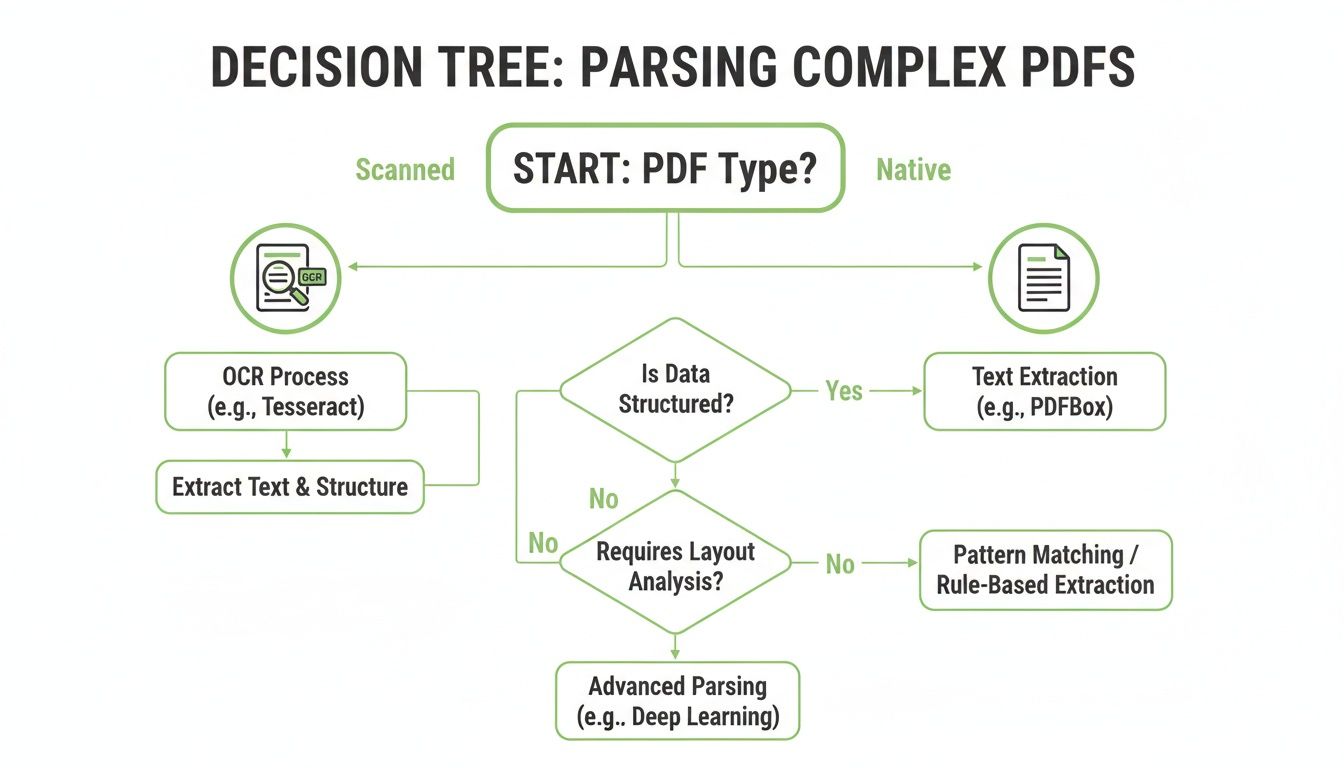
As you can see, the first fork in the road is always checking whether the document is scanned or text-native. That one check determines everything that follows.
The Balancing Act: Speed, Cost, and Accuracy
When it's all said and done, your choice comes down to balancing competing priorities. And real-world benchmarks show just how big those trade-offs can be.
Recent document parser test results on financial PDFs showed that while some open-source tools were fast, finishing in just 7.1 seconds, they mangled the headings in 20% of cases. A more advanced paid tool took 45 seconds but delivered perfect accuracy. In another head-to-head on scientific PDFs, PyMuPDF smoked PyPDF by 50%, extracting figures and metadata with 92% fidelity.
This data makes it pretty clear: investing a little more setup time in a robust tool like PyMuPDF, or accepting the overhead of Tesseract for scanned documents, almost always pays off in data quality. And better data quality directly translates to more accurate retrieval in your RAG system.
PDF Parsing Library Decision Matrix
To make this even more practical, here’s a quick decision matrix. Think of it as a cheat sheet for picking the right tool based on what you need to get done for your RAG pipeline.
| Requirement | PyMuPDF (fitz) | pdfplumber | PyPDF2 | Tesseract (OCR) |
|---|---|---|---|---|
| Simple Text Extraction | Excellent | Very Good | Good | N/A (for text-native) |
| Complex Layouts | Excellent | Good | Poor | Fair (layout analysis) |
| Table Extraction | Good (requires coding) | Excellent | Poor | Poor (tables are hard for OCR) |
| Image Extraction | Excellent | Good | Fair | Excellent (it is an image tool) |
| Scanned/Image PDFs | N/A | N/A | N/A | The Only Choice |
| Speed & Performance | Fastest | Fast | Very Fast | Slow |
| Ease of Use | Moderate | Easy | Very Easy | Moderate (requires setup) |
This table isn't about which library is "best"—it's about which is best for your specific job. Use it to quickly narrow down your options before you start writing code.
Turning Raw Extractions Into RAG-Ready Chunks
Alright, so you’ve successfully pulled the raw text out of your PDFs. That's a huge step, but honestly, it’s only half the battle. Raw text, no matter how clean, just isn't ready for a Retrieval-Augmented Generation (RAG) system. You need to transform that data into well-defined, context-rich chunks to get high-quality retrieval.
This is the critical bridge between extraction and embedding. I’ve seen teams get this wrong time and again by just splitting text every 1,000 characters. That's a recipe for disaster. You end up slicing sentences in half and completely destroying the context your RAG system needs to find anything useful. Smarter strategies are an absolute must.
Moving Beyond Basic Chunking
The best RAG systems I've worked on all have one thing in common: they use chunking strategies that respect the document's original structure. Forget arbitrary, fixed-size splits. It’s time to get more intelligent about how you group information.
Here are a few layout-aware methods that actually work:
- Section-Based Chunking: This is my go-to starting point. Split the document based on its headings and subheadings. It’s a natural way to group related content, making sure each chunk holds a complete, self-contained idea.
- Semantic Chunking: A more advanced technique where you use embedding models to group sentences or paragraphs based on their meaning. This creates chunks that are thematically tight, even if the formatting is inconsistent.
- Layout-Aware Splitting: Here, you use the bounding box data from libraries like PyMuPDF. This lets you group paragraphs or columns that are visually related, preserving the logical flow of the original document.
If you really want to go deep, our guide covers a ton of different chunking strategies for RAG. It'll help you find the right fit for your specific documents.
Enriching Chunks With Metadata
A chunk of text is okay, but a chunk enriched with metadata is a retrieval powerhouse. Metadata gives your RAG system the context it needs for precise filtering and more relevant search results. Think of it as the difference between finding a needle in a haystack and knowing exactly which row to search.
Your goal should be to make each chunk an independent, self-contained unit of information. Rich metadata is what gives a chunk its identity and context, dramatically improving its "findability" within your vector database.
When you python parse a pdf, don't just throw away the structural information. Capture it and bolt it onto each chunk. You should be thinking about including things like:
- Page Number: The absolute minimum, but essential for tracing back to the source.
- Section Title: The heading or subheading the chunk came from. This is huge for context.
- Document Source: The original filename or a unique document ID.
- Bounding Box Coordinates: The exact location of the text on the page, incredibly useful for verification or highlighting.
After you've parsed your PDFs, you might also find that specialized data collection software can help organize and analyze your extracted data, giving you a better handle on your overall business insights. Ultimately, you want to end up with a clean JSON output, where each object represents a chunk and its associated metadata, ready to be indexed.
Got Questions About Parsing PDFs?
When you start parsing PDFs in Python for a RAG system, you're going to hit a few walls. It's just part of the process. Getting past them quickly is the name of the game, so let's tackle the questions that pop up most often.
How Do I Handle Password-Protected PDFs in Python?
This is usually the first roadblock people run into. The good news is that most of the heavy-lifter libraries like PyMuPDF and PyPDF2 are built to handle encrypted files—but you absolutely need the password.
You'll typically just pass the password as an argument when you open the file. With PyMuPDF, for instance, it looks like this: doc = fitz.open('encrypted.pdf', password='your_password'). If you don't have the password, you're out of luck. The security is there for a reason, and there's no way to brute-force your way in.
What Is the Best Library for Extracting Tables for RAG?
This one's critical. The quality of your table data going into your RAG system depends heavily on the tool you pick.
- pdfplumber is a fantastic pure-Python option. It was literally designed to find and understand table structures in native PDFs.
- tabula-py is another powerhouse, but it comes with a Java dependency. If you're trying to keep your environment simple, that might be a deal-breaker.
- PyMuPDF has gotten surprisingly good at table extraction over the years, making it a solid choice if you want to stick with a single, do-it-all library.
For RAG specifically, I often lean on pdfplumber. It tends to deliver the cleanest structural output, which means less time spent on tedious post-processing before you can get that data into a vector store.
Pro Tip: Never trust extracted table data blindly. Even the best parsers can get tripped up by merged cells or funky layouts. A quick sanity check for the right number of rows and columns can save you a world of hurt from indexing corrupted data.
Why Does My Extracted Text Have Spacing and Character Issues?
Ah, the classic "word salad" problem. You extract text, and it's a jumble of weird spaces, missing characters, or jumbled words. This is hands-down the most common frustration with PDF parsing.
It usually happens because text inside a PDF isn't stored in a neat, linear order like a text file. The file just contains instructions on where to place characters on a page.
Your first move should be to try a more sophisticated library like PyMuPDF, which does a much better job of reconstructing the intended reading flow. If the text is still a mess, you'll need to roll up your sleeves and do some post-processing. A few well-placed regular expressions can clean up extra whitespace, but for really complex layouts, you might need to use the bounding box coordinates of each text block to re-sort them yourself before chunking.
Tired of wrestling with code just to get clean, RAG-ready chunks? ChunkForge gives you a visual studio to parse, chunk, and enrich your documents without the headache. With multiple chunking strategies, deep metadata enrichment, and a real-time preview, you can go from raw PDF to production-ready assets in minutes. Start your free trial today at ChunkForge.