
Python PDF Extract Text for Flawless RAG Systems
A practical guide to python pdf extract text workflows. Learn to select the right tools and techniques to build high-accuracy RAG pipelines that deliver.
If you're building a Retrieval Augmented Generation (RAG) system, getting the text out of your PDFs is more than just a simple task—it’s the critical first step. The quality of your text extraction directly dictates how well your retrieval system can find relevant context, which in turn determines the accuracy of your Large Language Model's (LLM) responses.
Why PDF Extraction Is Your RAG System's Biggest Hurdle
Let's be honest—flawless text extraction is the unsung hero of any high-performing RAG system. So many engineers treat PDF parsing as a solved problem, a box to tick before getting to the "real" work of embedding and retrieval. This is a huge mistake.
The truth is, your RAG system's success or failure is often decided right here, during extraction. It’s not just about getting words onto a screen; it's about preserving the document's original meaning and structure so your retrieval system has coherent, accurate context to work with.
The Downstream Chaos of "Good Enough" Extraction
When you just grab a basic Python library and run it on a complex PDF, the output is often a mess. This introduces noise that poisons your entire RAG pipeline, leading to poor retrieval and irrelevant context.
I've seen it happen time and again:
- Mangled Tables: Financial reports and scientific papers are built on tables. A simple text dump scrambles that structured data into a wall of jumbled numbers and labels. When a user asks about a specific data point, the retrieval system can't find it because the table's context is lost.
- Broken Paragraphs: Multi-column layouts, like those in academic papers, are a classic trap. A naive extraction tool will read straight across the columns, stitching together unrelated sentences. This creates nonsensical chunks that will never be retrieved for a relevant query.
- Invisible Artifacts: PDFs are full of hidden metadata, weird formatting characters, and other digital junk. If you don't clean this up, it pollutes your text, leading to noisy vector embeddings that reduce the precision of your similarity search.
This initial failure to preserve document structure has severe consequences. Your vector database gets filled with nonsensical chunks. When a user asks a question, the retrieval system pulls back garbage context because the embeddings don't accurately represent the document's meaning.
It all boils down to a simple principle: garbage in, garbage out. If the context you feed your RAG pipeline is fragmented and incoherent, the retrieved information will be just as unreliable, no matter how powerful your model is.
The Real Cost of Inaccurate Parsing
In the world of AI engineering, we often turn to Python libraries to pull text from PDFs for our RAG pipelines. But real-world stats show just how limited they can be. In one analysis of complex financial PDFs, like Uber's 10-K report, a popular library like PyPDF2 completely butchered the table data.
This kind of poor-quality output forces engineers into extensive, manual post-processing that can eat up 40-60% of their development time. You can see a more detailed analysis of these library limitations here.
This isn’t just about wasted hours; it's about retrieval performance. When a RAG system provides wrong answers because of bad parsing, it erodes user trust and fails at its core job. That’s why mastering how to python pdf extract text with a sharp focus on preserving context isn't just a technical detail—it's a strategic necessity for building a reliable retrieval system.
Choosing Your Python PDF Library For RAG Workflows
Before diving into code, it's crucial to pick the right tool for the job. Not all PDF libraries are created equal, especially when your goal is to feed clean, structured text into a RAG system. The right choice directly impacts the quality of the chunks you create and, therefore, the relevance of what your system retrieves.
Here's a quick comparison to help you decide which library best fits your needs.
| Library | Best For | Speed | Layout Preservation | Scanned PDF Support (OCR) |
|---|---|---|---|---|
| PyMuPDF/fitz | Speed, metadata, and extracting tables/images for RAG | Very Fast | Good | No (but can integrate) |
| pdfminer.six | Complex layouts and academic papers needing high precision | Moderate | Excellent | No |
| PyPDF2 | Simple text extraction and basic PDF manipulation | Fast | Poor | No |
| Apache Tika | Handling various file types beyond just PDF | Slow | Moderate | Yes (via Tesseract) |
| Pytesseract | Scanned documents and images (OCR) | Slow | Varies | Yes (core function) |
For most RAG projects, the actionable insight is to start with PyMuPDF for its balance of speed and layout awareness. If your documents are primarily complex academic papers, pdfminer.six is the superior choice for preserving semantic integrity. If scanned documents are in the mix, you'll have to bring in an OCR tool like Tesseract.
A Developer's Guide To Python Extraction Libraries
Alright, we've established that high-fidelity extraction is non-negotiable for RAG. Now it's time to get our hands dirty. The right library can mean the difference between clean, context-rich text and a jumbled mess that generates poor-quality embeddings. When you start looking, you'll find a ton of Python extraction libraries out there.
Choosing the right tool isn't just about pulling text out; it's about getting it out in a way that preserves the document's original structure. For RAG, that means keeping paragraphs intact and respecting table layouts to create meaningful chunks for retrieval.
Let’s dive into the code and see how the top contenders really stack up.
PyMuPDF (fitz): The RAG Engineer’s Workhorse
For most python pdf extract text tasks—especially for feeding a RAG pipeline—PyMuPDF (fitz) should be the first tool you reach for. It hits an incredible sweet spot between raw speed, layout preservation, and feature richness. It is a highly actionable choice for most projects.
What really makes PyMuPDF shine for RAG is its ability to extract text while staying aware of the document's visual layout. This helps you avoid that classic retrieval problem where text from adjacent columns gets mashed together, creating incoherent chunks that pollute your vector store.
Let’s see it in action. First, you'll need to install it:
pip install PyMuPDF
Now, here’s a quick snippet to pull text from a page. Notice how we specify sort=True—this little flag is crucial for maintaining a natural reading order, which directly improves the quality of your text chunks.
import fitz # This is the PyMuPDF library
doc = fitz.open("sample-report.pdf") page = doc.load_page(0) # Let's grab the first page text = page.get_text("text", sort=True)
print(text)
The output from this is almost always cleaner than what you’d get from older tools. But its real power for RAG lies in the advanced features. You can extract tables as structured data and images as potential inputs for multi-modal models, both of which can be used to enrich your knowledge base.
For a deeper look at PyMuPDF and other tools, check out our comprehensive guide on Python PDF libraries.
pdfminer.six: For Complex Structural Analysis
When you’re up against a truly gnarly document—think dense academic papers with intricate multi-column layouts—pdfminer.six is an excellent choice. It might be slower than PyMuPDF, but its strength is a ridiculously sophisticated layout analysis engine.
It works by analyzing the geometric relationships between every text block on a page, allowing it to reconstruct the original reading flow with impressive accuracy. This is invaluable when preserving the semantic integrity of the text is absolutely critical for retrieval accuracy.
To get started:
pip install pdfminer.six
The code is a bit more involved because you have to set up a resource manager and text converter, but this gives you incredibly fine-grained control over the parsing process.
from pdfminer.high_level import extract_text
text = extract_text("complex-academic-paper.pdf") print(text)
For RAG systems, the clean, ordered text you get from pdfminer.six means your embeddings will more accurately reflect the original document's meaning. This directly translates to better retrieval performance down the line.
Pro Tip: While pdfminer.six is fantastic for structural analysis, its speed can be a real bottleneck on large projects. I often use PyMuPDF for an initial pass and only bring in pdfminer.six for specific documents that fail a quality check or are known to have painful layouts.
PyPDF2: A Tool for Simpler Tasks
Let's be clear: PyPDF2 is a fantastic library for many PDF manipulations, like splitting or merging pages. But when it comes to high-fidelity text extraction specifically for RAG, it often falls short and can harm your retrieval performance.
Its text extraction engine is more basic. It can easily get tripped up by complex layouts, often spitting out jumbled text with lost whitespace. This creates low-quality chunks that are less likely to be retrieved for relevant queries. While it has improved over the years, it just doesn't perform the same level of deep layout analysis as PyMuPDF or pdfminer.six.
Here’s how you’d use it:
pip install PyPDF2
And the code to extract text is straightforward:
from PyPDF2 import PdfReader
reader = PdfReader("simple-document.pdf") page = reader.pages[0] text = page.extract_text()
print(text)
So when should you use PyPDF2 for a RAG project? Almost never for the extraction part. It’s fine for pre-processing steps like splitting a large PDF, but for the core text extraction, relying on it will likely degrade your system's retrieval capabilities.
Handling Scanned PDFs With OCR And Tesseract
So far, we’ve been dealing with digitally native PDFs—the easy stuff. But what happens when you’re handed a scanned document? Your trusty PyMuPDF or pdfminer.six will come back with nothing, because as far as they’re concerned, the file just contains an image.
This is a super common roadblock for RAG systems that need to ingest archival data, invoices, or legacy reports. When standard methods fail, you must use Optical Character Recognition (OCR) to make the content retrievable.
OCR is the magic that turns pictures of text into actual, machine-readable text. For anyone in the Python world, the go-to open-source engine for this is Tesseract.
Setting Up Your OCR Pipeline with Python
To get an OCR workflow running, you need two pieces of the puzzle: something to turn PDF pages into images, and something to run OCR on those images. We'll use the pdf2image library for the first part and pytesseract to talk to the Tesseract engine.
First things first, you have to install the Tesseract engine on your machine. This isn't a Python package; it's a separate system-level install. You can find the instructions over on the official Tesseract GitHub repository.
Once that’s sorted, you can grab the Python packages you need.
pip install pytesseract pdf2image
Heads up: pdf2image often needs a dependency called poppler.
On macOS: brew install poppler
On Ubuntu/Debian: sudo apt-get install poppler-utils
With everything installed, building a simple pipeline is straightforward. The flow is: open the PDF, convert each page into an image, and then feed that image to Tesseract.
Here’s what that looks like in code:
from pdf2image import convert_from_path import pytesseract
def ocr_scanned_pdf(pdf_path): # This turns all PDF pages into a list of PIL Image objects images = convert_from_path(pdf_path)
full_text = ""
for i, image in enumerate(images):
    print(f"Processing page {i+1}...")
    # Hand the image over to Tesseract
    text = pytesseract.image_to_string(image)
    full_text += text + "\n\n"

return full_text
scanned_text = ocr_scanned_pdf("scanned-document.pdf") print(scanned_text) This script is a solid starting point. It'll get you from an image-only PDF to a string of text you can actually use in your RAG system's knowledge base.
Boosting OCR Accuracy with Image Pre-processing
Just throwing raw images at Tesseract often gives you noisy, inaccurate text. The quality of your OCR output is completely dependent on the quality of the input image. Low-res scans and noisy backgrounds will confuse the engine, leaving you with garbled text that will poison your retrieval system.
To get dramatically better accuracy, you must add an image pre-processing step. This is where libraries like OpenCV or Pillow (PIL) come in handy.
Here are a few pre-processing tricks that make a huge difference:
- Grayscaling: Converting the image to black and white simplifies the data Tesseract needs to analyze.
- Binarization: This takes the grayscale image and makes it pure black and white, which sharpens character edges.
- Noise Reduction: Techniques like blurring can smooth out random speckles and artifacts from the scanning process.
- Deskewing: If a page was scanned at an angle, deskewing algorithms find that rotation and straighten it out, which is a massive help for Tesseract’s ability to find lines of text.
Spending a little extra time on pre-processing can easily give you a 20-30% boost in character recognition accuracy. For RAG, this is an actionable way to ensure the text you embed is clean and reliable, leading to better retrieval.
OCR is powerful, but it's also slow and resource-heavy. A smarter approach is to build a hybrid pipeline. First, try to extract text with a fast library like PyMuPDF. If a page returns little or no text, then you can kick it over to your OCR workflow. This gives you the best of both worlds: speed and total coverage.
Of course, once you have the raw text, you'll still need to clean it up. Using a good PDF to Markdown converter can help structure the output, making it much easier to chunk properly for your RAG pipeline.
Transforming Raw Text Into RAG-Ready Context
Extracting a raw string of text from a PDF is a great start, but it's nowhere near the finish line. If you just dump that raw output into a vector database, you're setting yourself up for poor retrieval. This is where the real work begins—turning that jumble of characters into clean, coherent, and contextually rich chunks that an LLM can use effectively.
<iframe width="100%" style="aspect-ratio: 16 / 9;" src="https://www.youtube.com/embed/pIGRwMjhMaQ" frameborder="0" allow="autoplay; encrypted-media" allowfullscreen></iframe>Getting this post-processing and structuring step right is what separates a frustrating, demo-quality RAG app from a production-ready system that delivers consistently accurate results. It’s the essential bridge between raw extraction and high-performance retrieval.
Cleaning and Normalizing Extracted Text
First things first: you have to clean up the noise. Raw text from PDFs is notoriously messy, filled with digital artifacts that will degrade the quality of your embeddings and confuse the retrieval process.
Your initial cleaning pass should hit a few key areas:
- Whitespace Normalization: PDFs are often riddled with extra newlines, tabs, and spaces. Collapse these down to reconstruct proper paragraphs for better chunking.
- Redundant Element Removal: Headers, footers, and page numbers add almost zero semantic value for retrieval. A few well-crafted regular expressions can strip these repeating patterns and improve the signal-to-noise ratio.
- Fixing Ligatures and Encoding Errors: You'll often see characters like "fi" or "fl" get extracted as a single, weird symbol. Implement replacement rules to fix these artifacts and ensure everything is standardized to UTF-8.
This initial cleanup isn't just about making things look pretty. Every unnecessary character you remove directly improves the quality of the vectors you'll generate, leading to more precise retrieval.
Moving Beyond Fixed-Size Chunking
Once your text is clean, you have to break it down into smaller pieces, or "chunks," for your vector database. The most basic approach is fixed-size chunking, where you just slice the text every N characters. It’s simple to implement, but it's a terrible idea for RAG.
A fixed-size chunker has absolutely no respect for your document's structure. It will blindly chop right through sentences and paragraphs, destroying the original context and making retrieved chunks less useful for the LLM.
This process, which shares principles with OCR workflows for scanned documents, is all about converting a static page into something usable.
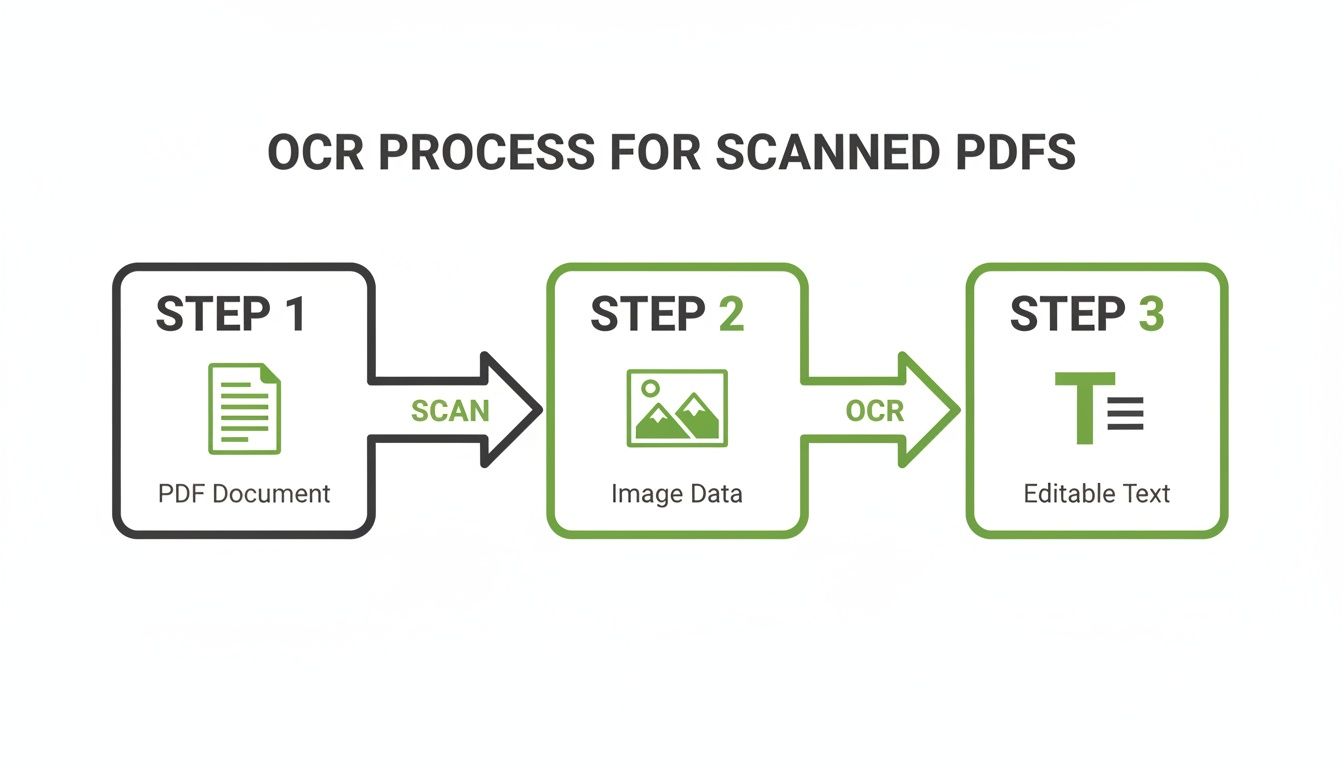
This flowchart really drives home that extraction is a multi-step conversion, not just a data dump. That’s why preserving context during the chunking phase is so critical. To build a high-performing RAG system, you must adopt more intelligent chunking strategies.
Adopting Intelligent Chunking Strategies
The whole point of chunking is to create self-contained, contextually complete units of information. When a user's query matches a chunk, that piece of text should give the LLM everything it needs to form a coherent answer. This is the core of effective retrieval.
Here are a couple of far more effective approaches:
- Recursive Chunking: This method is much smarter. It starts by trying to split text along major logical breaks, like paragraphs. If a paragraph is too big, it recursively splits it by smaller boundaries, like sentences. This respects the document's natural structure, creating more coherent chunks for retrieval.
- Semantic Chunking: This is a more advanced technique that uses an embedding model to analyze the relationships between sentences. It groups sentences that are semantically similar into the same chunk. This creates topically-organized chunks, which can be incredibly powerful for improving retrieval relevance.
If you really want to dial in your performance, diving deeper into the different chunking strategies for RAG is a non-negotiable step. The strategy you choose has a massive and direct impact on the quality of context your retriever finds.
Enriching Chunks with Metadata
Your job still isn't done after chunking. To make your retrieval system truly robust, you need to enrich each chunk with metadata. This extra information acts as a set of powerful filters that enable more precise retrieval.
At a minimum, you should include:
- Source Document: The name of the original PDF file.
- Page Number: The exact page the chunk came from.
- Section Headers: The headings or subheadings the text appeared under.
By storing this metadata right alongside your vector embeddings, you can run powerful hybrid searches. For example, a user could ask for information "about performance metrics from the Q4 financial report," and your system could first filter for chunks from the q4_report.pdf before it runs the semantic search. This dramatically improves retrieval precision and speed.
RAG-Ready Data Export Formats
Finally, you need to package all this cleaned, chunked, and enriched data into a format that your vector database or LLM pipeline can easily ingest. The structure you choose will define how your RAG system accesses both the text and its associated metadata for retrieval.
Here’s a quick rundown of some common formats.
| Format | Structure Example | Use Case | Key Advantage |
|---|---|---|---|
| JSON Lines (JSONL) | {"text": "...", "metadata": {"source": "doc.pdf", "page": 5}} | Batch processing and streaming data into vector databases. | Lightweight, easy to parse one line at a time without loading the whole file. |
| List of Dictionaries | [{"text": "...", "metadata": {...}}, {"text": "...", "metadata": {...}}] | In-memory processing with Python libraries like LangChain or LlamaIndex. | Simple to manipulate directly in Python scripts and notebooks. |
| Parquet | (Binary columnar format) | Large-scale data processing with tools like Apache Spark or Pandas. | Highly efficient for storage and querying, especially with large datasets. |
| CSV/TSV | text,source,page\n"Chunk 1 text","doc.pdf",5 | Simple data pipelines and integration with relational databases. | Universally compatible and easy to inspect in a spreadsheet. |
Choosing the right export format depends on your specific RAG architecture and tooling. For most Python-based workflows, a list of dictionaries or JSONL is a fantastic, flexible starting point that scales well as your project grows.
Optimizing Your Extraction Pipeline For Scale And Accuracy

It’s one thing to run a script on a single PDF. It's a whole different ballgame to build a production-ready pipeline that chews through thousands of them without breaking a sweat. For a RAG system, this pipeline's quality is paramount; it must deliver fast, accurate, and resilient extraction to keep your knowledge base pristine.
This is where you move past the happy path and start preparing for the messy reality of real-world documents. Simple scripts choke on complex layouts, dense tables, and irrelevant page clutter. If that noise gets into your vector store, your retrieval accuracy plummets.
Preserving Structure In Complex Layouts
One of the biggest challenges that directly impacts retrieval is preserving the original reading order. A naive script will read a two-column academic paper straight across the page, creating nonsensical chunks that will never be retrieved correctly.
To get around this, you have to get smart about layout analysis.
- Handling Multi-Column Text: This is a place where a library like
pdfminer.sixreally shines. It's built to analyze the geometric position of text blocks and reconstruct the proper reading flow, creating coherent paragraphs for chunking. - Extracting Tables as Data: Don't just dump tables as plain text. Instead, use a tool like PyMuPDF's
page.find_tables()or a dedicated library likecamelot-py. These tools can pull tables out into structured formats like Markdown. This preserves the relationships between data, making the information retrievable for queries about specific table contents.
Systematically Removing Noise
Production documents are full of junk: headers, footers, page numbers, and sidebars that repeat on every page. If you let this redundant information into your text chunks, you're polluting your vector database and reducing retrieval precision.
An effective pipeline must identify and discard this noise programmatically. Layout-aware tools can spot text blocks that appear in the exact same position on multiple pages—a dead giveaway for a header or footer. You can also use regular expressions to strip out common patterns like "Page X of Y."
The cleaner your input text, the higher the quality of your vector embeddings. Aggressively removing irrelevant page elements is a high-leverage activity for improving the signal-to-noise ratio in your RAG system's knowledge base.
Scaling Up With Parallel Processing
When you have a mountain of documents to process, running them sequentially is a huge bottleneck. This is where parallelization becomes a critical optimization. Python's multiprocessing library is a fantastic tool for spreading the workload across multiple CPU cores and slashing your processing time.
For broader insights on improving workflows, it's worth exploring different optimization strategies.
By setting up a pool of worker processes, you can have each CPU core tackle a separate PDF file at the same time. This simple change can turn a job that would have taken hours into one that finishes in minutes. For any RAG system that needs to regularly update its knowledge base, a parallel pipeline is essential for maintaining fresh data.
Common PDF Extraction Questions Answered
When you're deep in the trenches building a production-grade RAG system, theory gives way to some very real, very persistent challenges. The quality of your Python PDF extraction workflow is a direct predictor of your system's performance. So, let’s get straight to the questions that pop up most often.
Which Python Library Is Best For Extracting Tables From PDFs?
For most RAG use cases, your best bet is to start with PyMuPDF (fitz). Its page.find_tables() method is surprisingly good at pulling table data in a structured format. This is a crucial capability for RAG, because converting a table to structured text (like Markdown) preserves its relational context, making the data highly retrievable.
For extremely complex tables, like those in financial reports with merged cells, a specialist library like Camelot is the answer. It provides the fine-grained control needed to parse these structures correctly, ensuring the information within them is accessible to your retrieval system.
How Can I Improve Text Extraction Quality For My RAG System?
Boosting extraction quality is a multi-step process focused on preserving context to enable better retrieval.
- Pick the Right Tool for the Job: Always start with a layout-aware library like PyMuPDF. Preserving the natural reading order is critical for creating coherent text chunks.
- Get Aggressive with Post-Processing: Clean the raw text. Normalize whitespace, strip out repetitive headers and footers with regular expressions, and fix encoding errors.
- Chunk Smarter, Not Harder: Ditch fixed-size splits. Move to recursive or semantic chunking to ensure you don't break up a key idea in the middle of a sentence, which would destroy its value for retrieval.
- Enrich with Metadata: This is non-negotiable. Always attach source information like page numbers and section titles to your chunks. This unlocks precise filtering and dramatically improves retrieval relevance.
Why Is My Extracted Text Full Of Gibberish Or Strange Characters?
This is almost always an encoding problem. PDFs are notorious for using custom, non-standard encodings. When your library can't interpret them, you get garbled text that will ruin your embeddings. Always ensure you are decoding to a standard format like utf-8.
If that doesn't fix it, you're likely dealing with a tricky font issue. Switching to a more modern, robust library like PyMuPDF often solves this instantly, as it handles these edge cases far better than older tools like PyPDF2.
And what about just running everything through OCR? It might seem like an easy fix, but it's usually the wrong move.
Don’t fall into the OCR-everything trap. It's computationally expensive and can introduce new errors into digitally native text, degrading the quality of your knowledge base.
A much better strategy is to build a hybrid pipeline. First, try direct text extraction with PyMuPDF. If a page returns little or no text (a sign it's an image), then send that specific page to your OCR workflow. This gives you speed and efficiency while ensuring complete coverage for all document types.
Ready to stop wrestling with raw PDFs and start building better RAG systems? ChunkForge is a contextual document studio that converts your documents into retrieval-ready chunks with deep metadata enrichment. Try it free and see how much faster you can move from raw files to production-ready assets. Start your 7-day free trial today!