
Extract PDF Text Python: A Guide for RAG Systems
Learn to extract PDF text Python for high-quality, RAG-ready data. Master PyMuPDF, OCR, and advanced cleaning techniques for better AI retrieval.
To extract PDF text with Python, you'll often reach for libraries like PyMuPDF or PyPDF2. These tools are great for pulling raw text from digital documents. But for developers building a Retrieval Augmented Generation (RAG) system, the real work begins after you get that text. The quality of that extraction is the foundation for accurate retrieval and reliable AI responses.
Why Clean PDF Extraction Is The Bedrock Of A Strong RAG System
Getting text out of a PDF feels like it should be simple. But for a RAG system, this first step is everything. The quality of your text extraction pipeline directly impacts the performance and reliability of your AI application, specifically its ability to retrieve relevant context.
Think of it like building a house. If the foundation is cracked, everything you build on top of it will be unstable. It’s no different here.
The whole point of RAG is to combine a large language model's (LLM) reasoning ability with specific information retrieved from your own documents. The system searches your PDFs for relevant context, then feeds that context to the LLM to generate an accurate answer.
The Problem With "Garbage In, Garbage Out"
This entire process hinges on one thing: the quality of the retrieved information.
When you first extract PDF text with Python, the raw output is usually a mess. It's often littered with artifacts that are completely meaningless to an AI model and actively harm retrieval performance:
- Unwanted Headers and Footers: Page numbers, document titles, and confidentiality notices on every single page create repetitive, low-value chunks that pollute search results.
- Awkward Line Breaks: PDFs are designed for visual layout, not semantic flow. This means sentences get chopped in half, destroying the contextual integrity of the text chunks.
- Jumbled Tables and Lists: Data from a table can get extracted as one long, incoherent string of text, losing the critical relationships between rows and columns and making structured data un-retrievable.
- Hidden Characters: You’ll also find invisible artifacts from the PDF format that can corrupt the text and cause processing errors down the line.
This low-quality, poorly structured data pollutes your vector database. We have a whole guide on why this matters if you want to understand more about what parsed data is. When your vector database is full of corrupted text, the retrieval step fails, pulling back irrelevant or nonsensical chunks of information.
The consequence is simple: your RAG system will produce inaccurate, unhelpful, or completely fabricated responses. The LLM can't make sense of the "garbage" it's given, dooming your application from the start.
Shifting The Mindset
This is why treating the task to extract PDF text with Python as just another coding exercise is a huge mistake. It’s not about just getting the text out; it's about building the foundational layer for accurate data retrieval.
Every ounce of effort you put into cleaning, structuring, and preserving the context of the extracted text pays massive dividends in the quality of your final output. The following sections will give you the technical deep-dives needed to build a robust extraction pipeline—an essential skill for any developer building reliable AI systems.
Choosing Your Python PDF Extraction Toolkit
Picking the right library to extract PDF text with Python is one of the first, and most critical, decisions you'll make. It has a massive ripple effect on your RAG system's final quality. Not all tools are created equal—some are built for speed, others for precision, and some are jacks-of-all-trades. Getting this right from the start will save you from headaches and countless hours of refactoring down the road.
The world of PDF software is booming, driven by the intense demand for automated document processing. The market is on track to hit USD 2.66 billion by 2026 and is expected to grow at an 11.47% CAGR through 2035. Python is at the heart of this growth, with libraries like PyPDF4 and pdfminer.six racking up a combined 25 million downloads in 2025 alone. These tools now power over 55% of all open-source document processing projects. You can dig deeper into these trends in the full report from Business Research Insights.
But this choice isn't just about features. It’s about matching the tool to your documents and your goals. A simple, single-column report has completely different requirements than a dense, multi-column financial statement riddled with tables.
Python PDF Extraction Library Comparison
To make the choice clearer, I've put together a quick comparison table. It breaks down the most popular libraries, showing where they excel and where they fall short, especially when you're thinking about a RAG pipeline.
| Library | Best For | Key Strengths | Limitations |
|---|---|---|---|
| PyPDF2 | Quick prototypes, basic text from simple PDFs. | Simple API, good for metadata and basic manipulation. | Struggles with complex layouts, tables, and character encoding. |
| pdfminer.six | Accurate text extraction from complex layouts. | Superior layout analysis, better at handling character encodings. | Slower than PyMuPDF; can be complex to configure. |
| PyMuPDF (fitz) | High-performance, large-scale batch processing. | Extremely fast, handles text, images, and annotations with ease. | Less focused on deep layout analysis than pdfminer.six. |
| Apache Tika | Processing a wide variety of file types, not just PDFs. | Supports 1000+ file formats; language detection. | Requires a Java dependency and runs as a separate server, adding complexity. |
This table gives you a high-level view, but the best choice always depends on the nitty-gritty details of your project.
Diving Into The Top Contenders
Let's get into the specifics of a few key players. Each has a distinct personality and is suited for different kinds of work.
-
PyPDF2: This is often the first library a developer reaches for. It’s solid for basic tasks like merging, splitting, and pulling text from straightforward, digitally-native PDFs. But throw a complex layout, a tricky table, or some special characters at it, and you'll often get garbled output that demands a ton of cleanup.
-
PyMuPDF (fitz): When performance is non-negotiable, this is your go-to. It's built on the MuPDF C library, which makes it incredibly fast and robust. It's a true workhorse, excelling at not just text extraction but also handling images and preserving layout information. If you're batch-processing thousands of documents, its speed is a lifesaver.
-
Apache Tika: Tika's superpower isn't just PDF handling—it's universality. It can chew through over a thousand different file types, from Microsoft Word docs to emails. It runs as a separate server that your Python code calls via an API. This setup is more complex but absolutely worth it for pipelines that need to ingest a diverse flood of documents.
This flowchart really drives the point home. The initial state of your PDF—whether it's clean and selectable or a jumbled mess—has a direct line to the success of your RAG system.
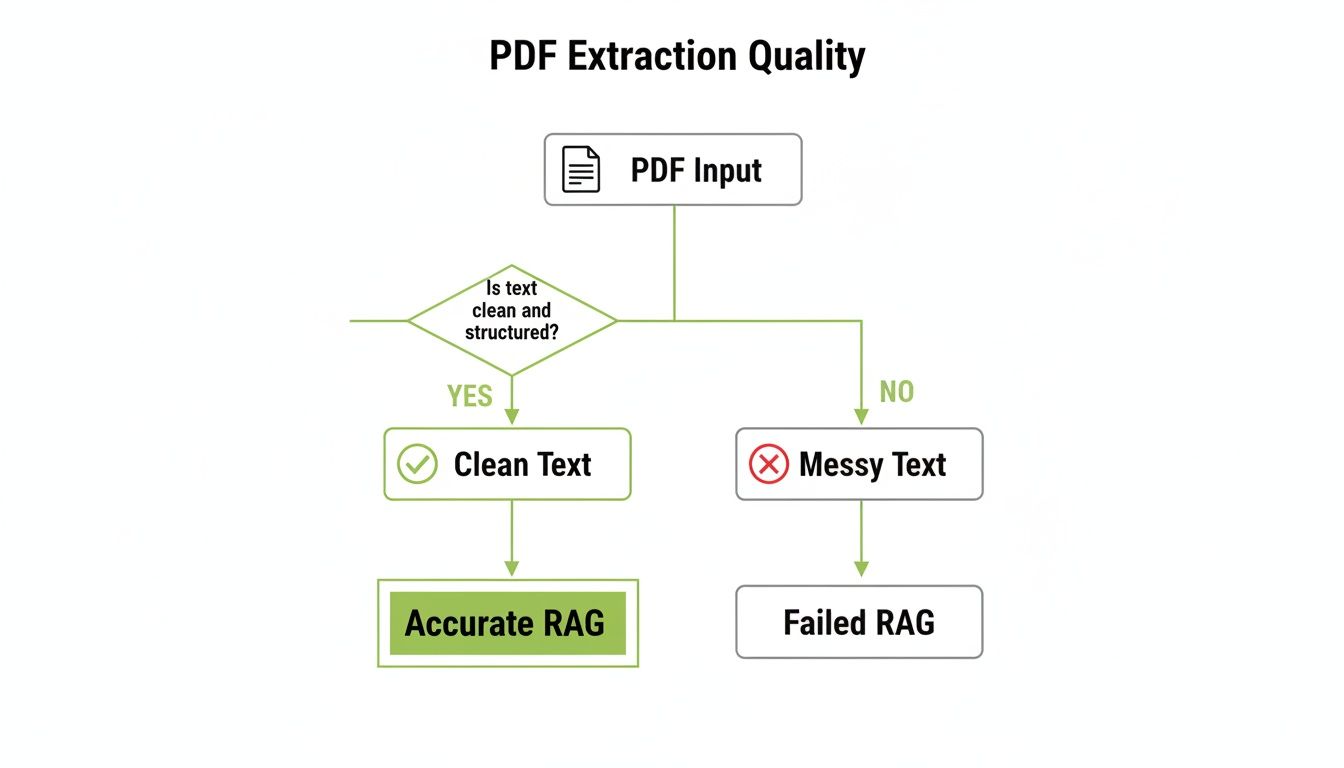
The takeaway is simple: the cleaner and more structured your text is at the beginning, the more accurate and reliable your RAG application will be at the end.
Making The Right Call For Your RAG Pipeline
So, what's the verdict? Your decision should come down to two things: the nature of your documents and the scale of your operation.
For a high-quality RAG system, preserving document structure is everything. Raw text is just the start. The real magic happens when you can understand and retain the context from paragraphs, headings, tables, and lists.
If you're just spinning up a simple prototype with clean, single-column PDFs, PyPDF2 can get you off the ground. But for most serious RAG applications dealing with real-world documents, PyMuPDF is the clear winner because of its speed and reliability.
And if your pipeline needs to be a universal document-processing machine? The initial setup complexity of Apache Tika will pay for itself many times over. For a more detailed breakdown, we have a deep dive into the landscape of Python PDF libraries you can check out.
Handling Scanned PDFs And Images With OCR
Sooner or later, you'll hit a wall. You'll run your trusty text extraction script on a PDF and get back… nothing. An empty string.
This usually means you're dealing with a scanned PDF. Instead of containing digital text, the file is just a wrapper for a collection of images—think scanned reports, old archives, or even photos of a document taken with a phone. For these, standard libraries are useless. This is where Optical Character Recognition (OCR) comes into play.
An OCR pipeline is your bridge from image to text. It analyzes an image, identifies the characters, and converts them into machine-readable strings. If you're building a RAG system, this isn't just a "nice-to-have"; it's a core competency. A massive amount of real-world knowledge is trapped in these image-based documents, and failing to extract it creates a huge blind spot in your system's knowledge base.
Building Your Python OCR Workflow
You can build a surprisingly robust OCR workflow right in Python. It's really a two-step dance: first, you convert each PDF page into a high-quality image, and then you feed that image to an OCR engine.
Here’s the dream team for this job:
-
Image Conversion with PyMuPDF (fitz): While some tutorials point to libraries like
pdf2image, I've found that PyMuPDF is often faster and more direct. It can render PDF pages as image objects right in memory, which means you don't have to clutter your disk with temporary files. It's clean and efficient. -
Text Recognition with Pytesseract: This is the go-to Python wrapper for Google's Tesseract OCR engine. Tesseract is a powerful, open-source workhorse that takes an image and spits out the text it finds.
Together, PyMuPDF and Pytesseract create a powerful and streamlined pipeline. One handles the PDF-to-image conversion with speed, and the other does the heavy lifting of text recognition.
Pro Tips for Improving OCR Accuracy
Just throwing a raw image at Tesseract often produces disappointing results, especially if the original scan is less than perfect. You'll get garbled text full of errors, which will absolutely poison your RAG system's knowledge base and lead to flawed retrieval.
The secret to accurate OCR isn't the engine itself—it's image preprocessing. You have to clean up the image before Tesseract ever sees it.
Improving the quality of the input image is the single most effective way to boost OCR accuracy. A few simple preprocessing steps can reduce character error rates by over 50%, transforming garbled text into clean, usable data for your RAG pipeline.
You can implement these crucial preprocessing steps using a library like OpenCV (cv2):
- Grayscaling: Color information is usually just noise for an OCR engine. Converting the image to grayscale simplifies the task and helps the engine focus on the characters.
- Binarization (Thresholding): This is a game-changer. It converts the image to pure black and white, making characters stand out sharply against the background.
- Denoising: Scans often have tiny specks or "noise." Denoising algorithms clean this up so the OCR engine doesn't mistake a random dot for a period or part of a letter.
- Deskewing: If a document was scanned at a slight angle, the text will be tilted. Deskewing algorithms detect and correct this rotation, which is critical for helping the engine properly identify lines of text.
By adding these steps, you're giving Tesseract a much cleaner signal to work with. You can also fine-tune Tesseract's own settings, like specifying the language (-l eng) or changing Page Segmentation Modes (PSMs) to give it hints about the document's layout.
Properly preparing your input is just as important as the extraction itself. We dive deeper into transforming messy source documents into clean formats in our guide to creating a PDF to Markdown converter.
Preparing Your Extracted Text For RAG Systems
<iframe width="100%" style="aspect-ratio: 16 / 9;" src="https://www.youtube.com/embed/A20veQB_0GU" frameborder="0" allow="autoplay; encrypted-media" allowfullscreen></iframe>Pulling raw text from a PDF is just the starting line. What you actually get from most tools is a messy stream of characters, littered with digital junk that can cripple a Retrieval-Augmented Generation (RAG) system.
The next step is the most important one for enabling accurate retrieval: turning that chaotic output into clean, structured, and meaningful content. If you skip this, you’re essentially feeding your vector database garbage. The result? Irrelevant search results and LLM responses that make no sense.
Cleaning The Inevitable Digital Debris
First things first, you have to play janitor. PDFs are full of repetitive, context-free elements on every single page. You absolutely must scrub these out before you even think about chunking the text for your vector database.
Here’s what to hunt for:
- Headers and Footers: Page numbers, document titles, and "CONFIDENTIAL" stamps are pure noise. A few well-crafted regular expressions can usually wipe these out, preventing them from diluting the semantic meaning of your text chunks.
- Mangled Line Breaks: PDFs care about visual layout, not sentence structure. This means you get hard line breaks right in the middle of a thought. You'll need logic to stitch these broken sentences back together, preserving the full context necessary for accurate embeddings.
- Weird Whitespace: It's common to find a mix of tabs, multiple spaces, and other invisible characters. Normalize it all down to single spaces to keep your text consistent.
These aren't just nice-to-haves. They're the foundation for creating high-quality embeddings for your RAG pipeline.
Preserving The Document's Logical Structure
Once the text is clean, the real work begins—rebuilding the document's original structure. A flat wall of text loses all the rich context that headings, lists, and tables provide. This context is critical for effective retrieval.
When you successfully identify and tag structural elements like headings and paragraphs, you're not just cleaning text—you're providing crucial contextual clues to your retrieval system. This allows for more intelligent chunking and helps the RAG model understand the hierarchy and relationship between different pieces of information.
To pull this off, you need to look beyond the text itself and analyze the layout. Libraries like pdfminer.six or PyMuPDF are great for this because they can give you the coordinates and font information for text blocks. With that data, you can start to programmatically identify key elements:
- Headings: Look for text that’s bigger, bolder, or has more space around it.
- Paragraphs: The empty space between blocks of text is a dead giveaway for a paragraph break.
- Lists: Lines starting with bullets, numbers, or dashes are obvious list items.
This structured information is gold for creating context-aware chunks that dramatically improve retrieval relevance.
Grouping Content and Adding Metadata
The final step before chunking is to enrich your clean, structured text with metadata. This means attaching useful labels to your text segments, a powerful trick for boosting retrieval accuracy.
This kind of advanced document handling is at the heart of Intelligent Document Processing (IDP). It’s a field exploding in popularity, projected to hit USD 4,382.4 million in 2026 and grow to a massive $17,826.4 million by 2032. Python libraries are already the engine behind 68% of IDP prototypes, proving their worth in tackling complex data like tables, which show up in 40% of all enterprise PDFs. You can dig into more of these intelligent processing statistics to see the trend.
One of the most crucial pieces of metadata you can add is the source page number. By linking every chunk of text back to its original page, you build traceability directly into your RAG system. This allows you to provide citations, letting users verify the source and building trust in your application. That’s a hallmark of a production-ready, enterprise-grade AI system.
Smart Chunking and Metadata for RAG Success
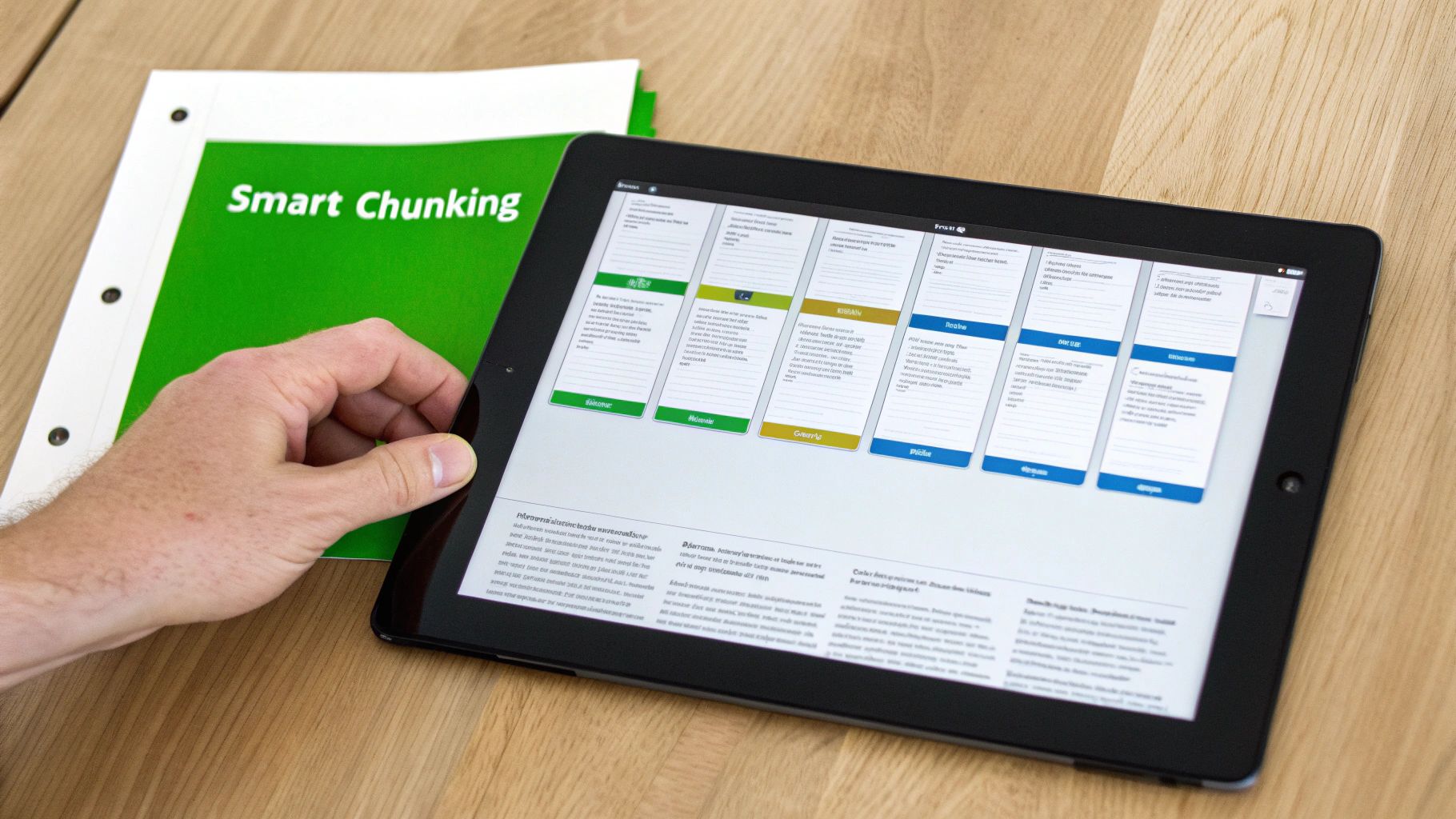
Alright, you've got clean, structured text from your PDFs. This next part is where you can make or break your RAG system's performance. I'm talking about chunking.
How you decide to split up your text directly determines how well your system can find what it needs when a user asks a question. Get it wrong, and you'll feed your LLM junk.
If you split a paragraph right down the middle, you sever the context. The two new chunks are basically useless on their own, and your retrieval system has no chance of piecing together the original idea. This leads straight to irrelevant search results and inaccurate answers.
Finding the Right Chunking Strategy
There’s no one-size-fits-all answer here. The best strategy really depends on your documents and what you're trying to do. A lazy approach, like splitting the text every 500 characters, is a recipe for disaster—you're almost guaranteed to break important thoughts mid-sentence.
Instead, think about creating semantically coherent chunks:
- Paragraph-Based Splitting: This is a great place to start. Paragraphs are designed to hold a single, complete idea, so splitting along these lines helps keep the meaning intact and creates high-quality, retrievable units.
- Heading-Based Splitting: If you're working with well-structured reports or manuals, you can group all the text under a specific heading. This creates bigger chunks that are rich with context, ideal for retrieving answers to broader questions.
- Semantic Chunking: This is a more advanced move. It uses embedding models to group sentences by their meaning, not just their position in the text. It creates incredibly relevant chunks but does require a bit more processing power.
Remember, the point of chunking isn't just to make text smaller. It's to create self-contained, contextually complete units of information that give your RAG system a fighting chance to find the right answer.
Don't Forget Metadata Enrichment
Once your text is chunked, there's one last crucial step: enriching each piece with metadata. This is where you attach context—like summaries, keywords, or where the text came from—to every single chunk. This metadata can then be used to filter search results, dramatically improving retrieval precision.
For example, just adding the source PDF's filename and the original page number is a simple but powerful piece of metadata. It means your RAG system can't just give an answer; it can cite its source. That's a huge deal for building user trust. You can also add headings or chapter titles as metadata, allowing you to narrow a search to only the most relevant sections of your documents.
This whole field of document intelligence is exploding. Back in the early 2000s, the idea to extract PDF text with Python was pretty niche. By 2020, library downloads were hitting 15 million a year—a 1,150% jump from 2015.
Today, the PDF data extraction market is sitting at around $2.0 billion globally, and that growth is directly connected to AI engineers building sophisticated RAG pipelines. If you're interested in learning more, check out these insights on the best API for data extraction on Parseur.com. Ultimately, thoughtful chunking and rich metadata are the high-quality fuel your RAG system needs to perform.
Common PDF Extraction Questions Answered
When you're wrestling with PDF text extraction in Python, especially for a RAG system, you'll inevitably hit a few common snags. Let's tackle some of the most frequent questions that pop up, building on the techniques we've already covered.
What’s The Best Python Library To Extract Tables From A PDF?
For tables, you have two fantastic options, each with its own strengths: PyMuPDF (fitz) and Camelot.
PyMuPDF is my go-to for speed. It's incredibly fast and does a decent job of keeping the visual layout of a table intact. The catch? You'll probably need to write some custom post-processing code to make sense of the rows and columns it spits out.
If you need surgical precision, however, Camelot is the tool for the job. It was built specifically for table extraction. It’s brilliant at parsing complex tables and can hand you the data in a clean format like a Pandas DataFrame. For RAG systems where preserving those data relationships is critical for accurate retrieval, Camelot is often the winner.
How Can I Speed Up Processing For Thousands Of PDFs?
Processing a huge batch of documents can feel daunting, but it's totally manageable. Your first move should be to pick a high-performance library. PyMuPDF is an absolute workhorse here, blowing past alternatives like PyPDF2 in raw speed.
Next, it's time to go parallel. Python's built-in multiprocessing module is your best friend. It lets you fire up multiple processes across your CPU cores, chewing through several PDFs at once. By creating a simple batch processing pipeline, you can turn a multi-hour job into something that runs in just a few minutes, making it feasible to index large document corpora for your RAG system.
Why Does My Extracted Text Have So Many Extra Spaces?
This is probably the most common headache. The text looks fine in the PDF, but your output is a mess of weird gaps and line breaks.
The root cause is that PDFs care about visual layout, not logical text flow. To a PDF, a paragraph is often just a collection of separate text blocks positioned on a page. When you extract the text, you get the raw content of those blocks, spaces and all.
The fix is a solid post-processing script. You'll want to use regular expressions to clean things up. This means merging words that were hyphenated across lines and squashing all multiple spaces or newlines down to a single one. This cleanup stage is non-negotiable for feeding high-quality, coherent text into your RAG system's vector database.
For more hands-on discussions and solutions for challenges like these, the community over at illumichat's Blog is another great place to find insights.
Transform your messy documents into structured, RAG-ready assets effortlessly. ChunkForge provides the advanced chunking strategies, metadata enrichment, and real-time visualization you need to build powerful and accurate AI systems. Start your free trial today and see the difference clean, contextual data makes. Find out more at https://chunkforge.com.